

Updated: September 2026 · By the KKeyQik Team
“Landing page design that converts is not decoration — it is decision architecture: every section on the page earns its place by removing friction and moving one visitor toward one action.” A landing page has a single job. It does not showcase your company, tell your story, or invite exploration.
It asks the visitor to do one thing — fill out the form, request the quote, book the visit — and it removes every obstacle between arriving and acting. That focus is what separates landing pages from the rest of your website, and it is why so many businesses see their paid traffic and email campaigns underperform: they send motivated visitors to a homepage and hope for the best.
We do landing page design for small businesses every week, and the pattern is consistent. The pages that convert are not the prettiest. They are the clearest. They match the promise that brought the visitor there, they say exactly what happens next, and they make the action feel easy and safe. This article walks through the anatomy of a high-converting page, section by section, so you can see what each part is doing and what to fix when a page is not pulling its weight. That diagnostic habit is what separates professional landing page design from guesswork.
Key Takeaways
- A landing page has one job: move one visitor toward one action. Anything that does not serve that action is a distraction.
- The above-the-fold area must communicate what you offer, who it is for, and what to do next within seconds.
- Proof — testimonials, results, and trust signals — should appear before the form, not hidden at the bottom.
- Fewer form fields, one clear CTA repeated down the page, and an honest privacy note reduce abandonment.
- Most visitors arrive on a phone: thumb-reach CTAs, tap-to-call, and fast loading are conversion features, not niceties.
What Each Section of the Page Is Doing
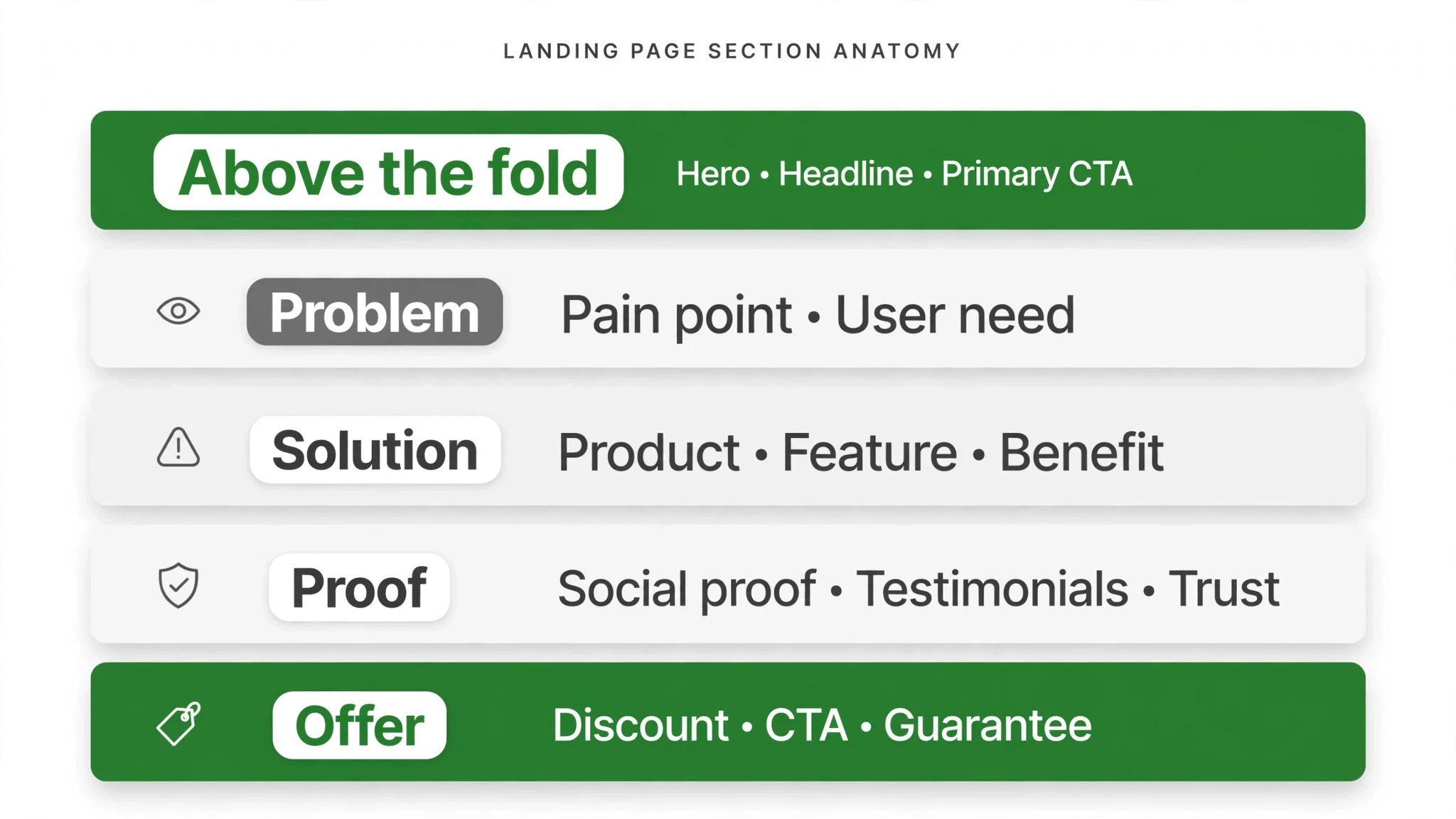
Before we walk through the page top to bottom, here is the full anatomy at a glance. Every row is one section, what it is supposed to accomplish, and the mistake we see most often.
| Page section | Job it does | Common mistake |
|---|---|---|
| Above the fold | States the offer, the audience, and the action within seconds | Clever headline that says nothing; CTA buried below the fold |
| Problem / agitation | Shows the visitor you understand their pain better than they do | Jumping to the pitch before the visitor feels understood |
| Solution and how it works | Presents the offer as the answer in three simple steps | Feature lists that describe the business instead of the outcome |
| Proof | Removes doubt with testimonials, results, and trust signals | Anonymous quotes with no names, photos, or specifics |
| Objection handling | Answers the questions that keep visitors from acting | Pretending concerns do not exist and hoping visitors convert anyway |
| Offer and form | Makes the action simple, safe, and obvious | Ten-field forms and a vague “Submit” button |
| Mobile details | Adapts every interaction for thumbs and small screens | Desktop-first layouts that break on the device most visitors use |
| What to remove | Cuts navigation, competing CTAs, and distracting links | A full site menu that gives visitors an exit at every scroll |
1. Above the Fold: Earn the Next Ten Seconds
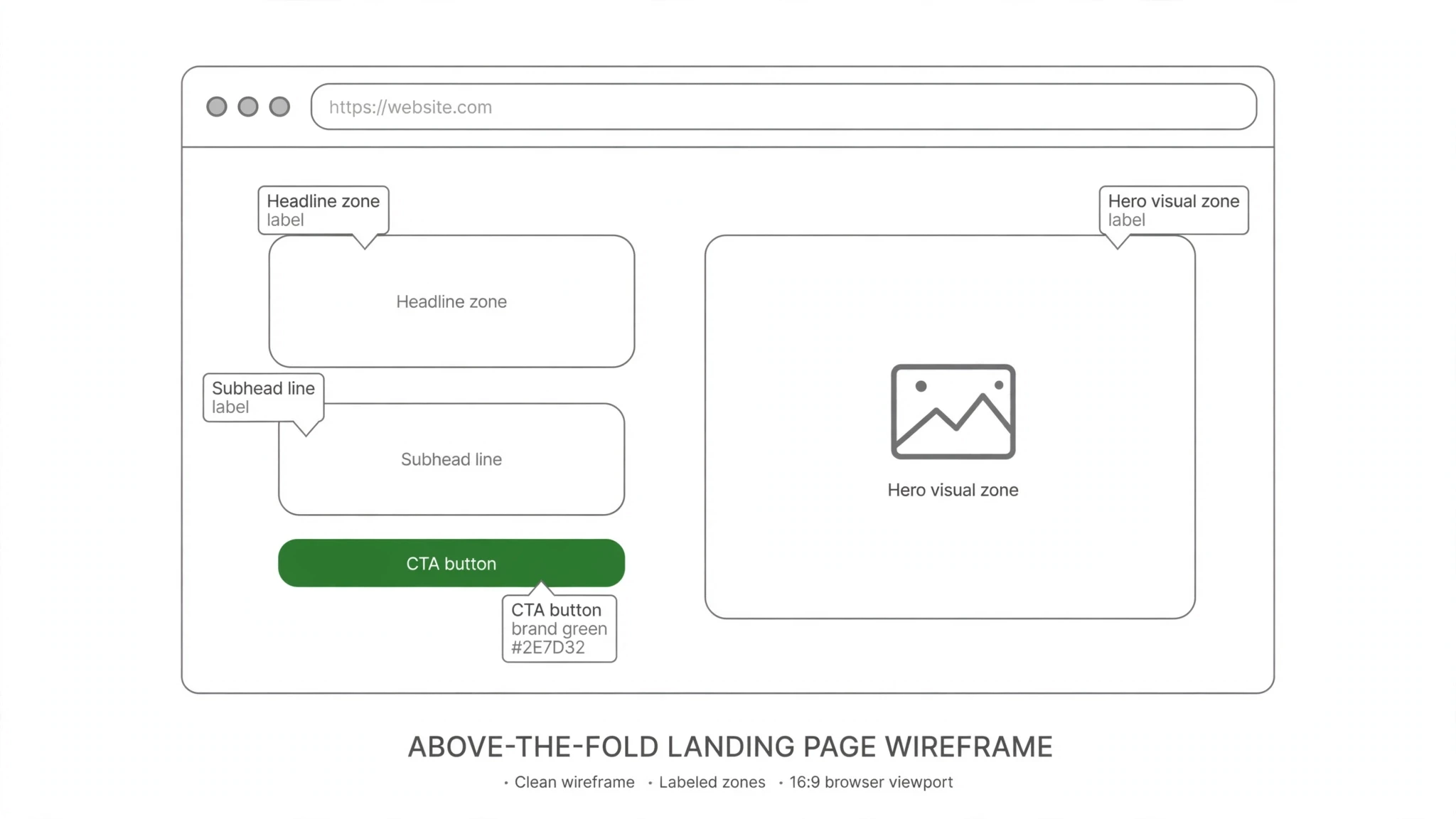
The top of the page — what a visitor sees without scrolling — decides whether the rest of the page gets read. It needs four elements working together: a headline that states the outcome, a subheadline that sharpens it, a primary CTA button, and a supporting visual that shows the offer or the result. The headline should finish the visitor’s sentence: they arrived wondering “can this solve my problem?” and the headline answers it directly.
The subheadline adds the audience and the mechanism — who it is for and how it works. The CTA button tells them exactly what happens when they click, using action verbs tied to the offer: “Get My Quote,” “See My Options,” “Request the Estimate.” The visual should show the product, the result, or a real person from your business — not a generic stock photo that could belong to anyone.
2. The Problem Section: Prove You Get It
Right below the fold, describe the visitor’s problem in their own language. This is where most landing pages skip ahead to the pitch, and it costs them. A visitor who does not feel understood will not trust the solution. Name the frustration, the failed attempts, the cost of doing nothing. If you serve homeowners, talk about the contractor who never showed up and the project that stalled for months. If you serve busy founders, talk about the hours lost to work that should have been delegated. Two or three short paragraphs are enough. The goal is a nod: “These people have dealt with someone like me.”
3. The Solution: Three Steps, Not a Feature List
Once the problem is clear, present your service as the answer — in three steps. Three is not a magic number, but it is the right shape: simple enough to read in seconds, structured enough to feel like a real process. “Tell us what you need. We do the work. You get the result.” Each step gets one line. Resist the urge to list features here; features describe what you do, and visitors buy what happens to them. If a feature matters, translate it into the outcome it produces. A process that looks simple also looks achievable, which is exactly the feeling that keeps a visitor moving toward the form.
4. Proof: Let Someone Else Say It
Proof is the section most small business landing page designs underbuild. By this point the visitor is interested, but interest is not trust. Stack several kinds of evidence: short testimonials with real names and photos, the specific results clients got, trust badges from recognizable organizations or review platforms, and a row of client logos. Specific beats superlative every time — “They finished in six days and the kitchen was usable the whole time” persuades more than “amazing service.” Place your strongest testimonial close to the first form appearance, not buried at the bottom where only the convinced will see it.
5. Objection Handling: Answer Before They Leave
Every offer has two or three objections that kill conversions: it sounds expensive, it sounds like a hassle, or it sounds too good to be true. Address them directly instead of hoping visitors will overlook them. Short, honest statements work best: what is included, how long it takes, what happens after they submit the form, and what the guarantee or policy is.
This section is also where a simple comparison or a few honest statements about scope prevent the wrong visitors from converting — and a visitor who self-selects out was never going to be a good client anyway.
6. The Offer and the Form: Make Acting Effortless
The form is where conversions are won or lost, so treat it as the centerpiece it is. Keep fields to the minimum you genuinely need to follow up — name, phone or email, and one line about what they need.
Every additional field is a reason to leave. Repeat the same primary CTA from the top of the page rather than introducing a new one, and make the button copy specific to the offer instead of a generic “Submit.” Add a short privacy note directly under the button: “We will only use this to contact you about your request.” That one line costs nothing and answers the worry every visitor has about handing over their details. Finally, restate what happens next right beside the form: “We respond within one business day with your options and next steps.” Uncertainty kills forms; a clear next step saves them.
7. Mobile Details: Design for the Thumb First
Most of your visitors will read this page on a phone, so mobile-first landing page design is not a separate task — it is the main task. Keep the primary CTA within easy thumb reach and repeat it after each major section so visitors never have to scroll back up.
Use tap-to-call buttons for service businesses, because many mobile visitors would rather tap a number than type into a form. Keep paragraphs to two or three lines, headlines short enough to read at a glance, and the page fast: compress images, avoid heavy animations, and load only what the page needs. A page that stutters on a mid-range phone is a page that loses the visitor who was closest to converting.
8. What to Remove: Cut the Exits
In landing page design, the page is a closed room with one door. Remove the site navigation menu — every menu link is an exit that takes the visitor away from the form. Remove competing CTAs: one page, one action, one button copy repeated throughout. Cut social media icons, footer link farms, and any link that leads away from the conversion.
If the page must carry legal links, shrink them to a minimal footer that does not compete for attention. The homepage can be the front door of your business; landing page design makes the page the consultation room. Confusing the two is the single most common reason paid campaigns leak money. Getting landing page design right plugs that leak at the source.
How Landing Pages Differ from Homepage Design
Your homepage serves everyone: the curious browser, the returning client, the job seeker, the press. It has to orient, impress, and route. A landing page serves one visitor with one intent, usually arriving from an ad, an email, or a search for something specific. That is why the rules invert: the homepage offers many paths; the landing page offers one. The homepage can afford atmosphere and storytelling; the landing page spends every pixel on the decision. When businesses treat the two the same, they usually end up with a homepage trying to convert like a landing page — and converting like neither.
The Build Sequence: From Blank Page to Live
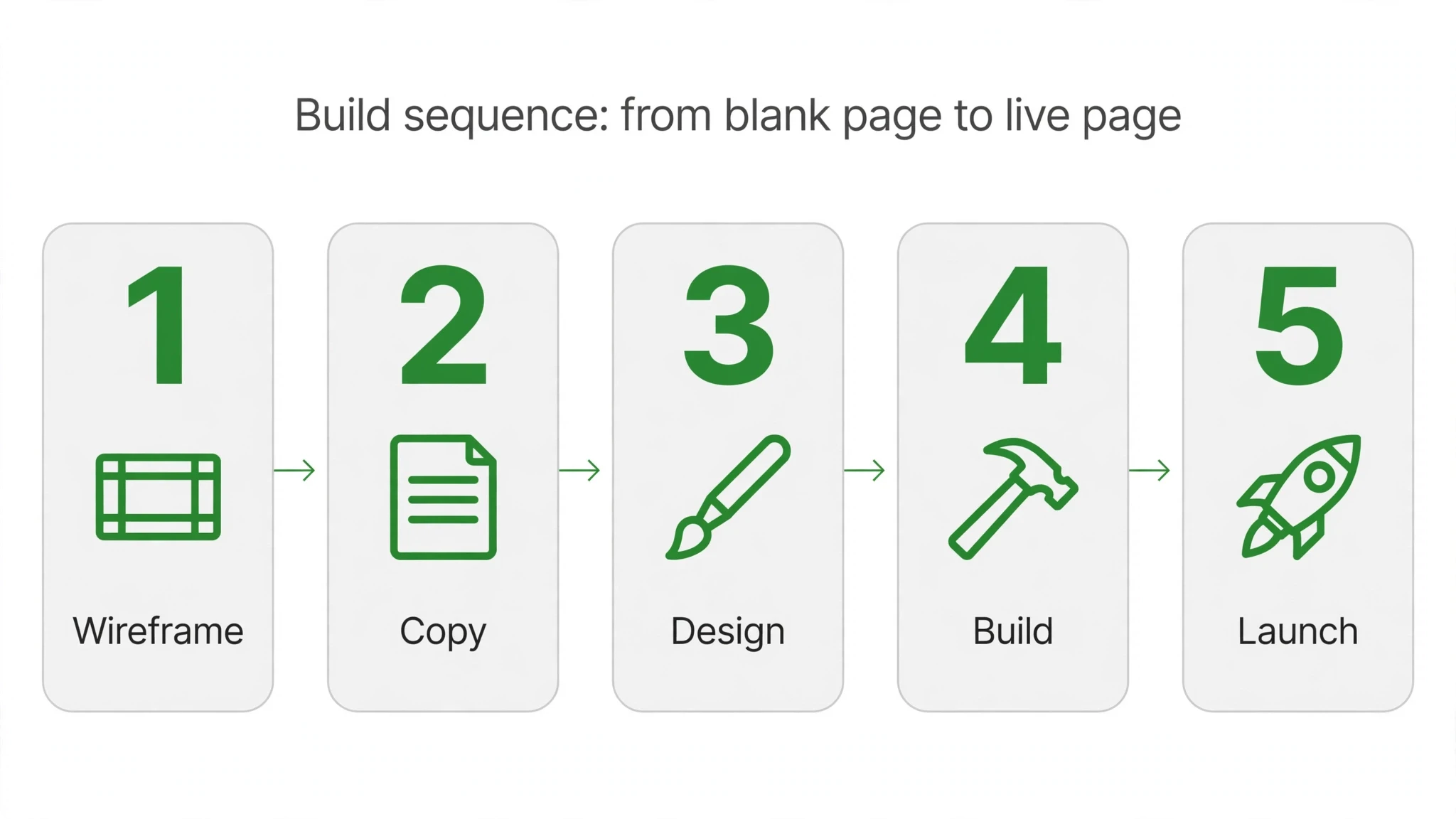
If you are building or rebuilding a landing page, follow this order. Each step builds on the one before it, so resist the temptation to start with the visuals — in landing page design, structure comes first.
- Define the single action the page must produce, and the exact audience it serves.
- Write the headline, subheadline, and CTA copy before touching any layout.
- Draft the three-step process and translate every feature into an outcome.
- Collect proof: testimonials with names and photos, results, logos, and trust badges.
- List the top objections and write one honest answer for each.
- Build the form with the fewest fields you need, one repeated CTA, and a privacy note.
- Design mobile-first: thumb-reach CTAs, tap-to-call, short paragraphs, fast load.
- Strip the navigation, competing CTAs, and every link that leads off the page.
- Test the full flow on a real phone, on a slower connection, before you publish.
This article is part of our guide to web design and development services for small business.
Landing Page Design QA: The Pre-Launch Check
Before any landing page goes live, run it through this quality check. Good landing page design survives all six questions. One: can a first-time visitor state your offer in one sentence after five seconds? If not, the headline is doing decoration instead of work. Two: is there exactly one primary action, repeated at every scroll depth? Landing page design fails most often here — two competing buttons split the click and halve the conversion.
Three: does the page answer the top three objections before the form? Price anxiety, trust anxiety, and effort anxiety kill more conversions than weak copy. Four: is the proof specific — real names, real numbers, real outcomes? Vague claims are wallpaper. Five: does the form ask for the minimum information you need to start a conversation? Every extra field is a small tax on the visitor’s patience. Six: does the whole page work one-handed on a phone, with the CTA reachable by thumb?
Treat landing page design as a checklist discipline rather than an art project and your pages get better on a predictable curve. Launch, measure where visitors stall, fix that one section, and repeat. The teams that win at landing page design are rarely the most creative in the room — they are the most systematic.
Ready to Turn More Clicks Into Clients?
A landing page is only as good as the strategy behind it. We design landing pages that are built around one clear action, backed by proof, and tested on the devices your visitors actually use. If your ads or emails are sending traffic to a page that is not converting, tell us about your business through our contact page and we will take a look at what the page is doing — and what it should be doing instead.
Frequently Asked Questions
Move one visitor toward one action — fill out the form, request the quote, book the visit. It does not showcase your company, tell your story, or invite exploration. Anything that does not serve that action is a distraction.
It can, as long as the promise matches what each visitor was told before clicking. When ad traffic and email traffic arrive expecting different things, one page starts underperforming for one of them. The fix is usually two versions of the page with matched headlines, not one compromise page. Message match matters more than traffic source — the page should finish the sentence the click started.
What you offer, who it is for, and what to do next — within seconds. The post calls this earning the next ten seconds. If a visitor cannot answer those three questions immediately, they bounce before scrolling.
Short — two or three paragraphs is usually enough to earn the nod of recognition. Its job is to show you understand the visitor's pain in their own words, not to document every frustration they have ever felt. If the section runs longer than the solution section, trim it; the visitor came for the answer, not the diagnosis. End the section the moment the visitor thinks 'these people have dealt with someone like me.'
Below the proof, in a compact section visitors can scan after they already trust you. Features answer 'what exactly do I get,' which only matters once the visitor believes you can deliver the outcome. Translate each feature into the result it produces — 'same-day response' beats 'dedicated support line.' A feature list near the form can also settle last-minute doubts right before the visitor acts.
Before the form, not hidden at the bottom. Testimonials, results, and trust signals should support the offer while the visitor is still deciding. Proof placed after the action they were supposed to take arrives too late.
Make acting effortless: fewer form fields, one clear call to action repeated down the page, and an honest privacy note. The post notes that every section must reduce friction. Each extra field is another reason to abandon the form.
Most visitors arrive on a phone, so thumb-reach calls to action, tap-to-call, and fast loading are conversion features, not niceties. Design for the thumb first. A page that works on desktop but frustrates on mobile leaves most of its conversions on the table.
For paid traffic, yes — every menu link is an exit that takes the visitor away from the one action the page exists for. Visitors who want to explore your company can do it after they convert, not instead of converting. Keep only the legal links in a minimal footer that does not compete for attention. If losing the menu feels risky, test it on one campaign and compare form fills before deciding.
Review the key numbers monthly — where visitors stall, which section they never reach, and how the form performs on phones. Change one section at a time so you know what caused any improvement. Most pages need a headline or offer refresh every few months as the audience and competition shift. A page you never revisit quietly decays; a page you tune on a schedule compounds.