


Updated: September 2026 · By the KKeyQik Team
Web design and development services for small business are the combined discipline of planning, designing, and building a website that turns visitors into customers — not a digital brochure, but a working sales asset. In 2026, the gap between a website that looks fine and a website that produces revenue comes down to six decisions: what the design prioritizes, which platform it runs on, when it gets rebuilt, how its landing pages are structured, how fast it loads, and how well it serves local customers. Get those six right and the site drives measurable growth. Get them wrong and it quietly costs you business every single week.
Key Takeaways
- Design and development are one service now — splitting them between a designer and a separate developer is where most small business websites go wrong.
- A small business website has one job: convert visitors. Every design decision should be judged against that, not against how the site looks in a portfolio.
- The six decisions that determine whether your site produces revenue: design priorities, platform choice, redesign timing, landing page structure, page speed, and local-business fit.
- WordPress vs Shopify is a business-model question, not a technology question — the right answer depends on whether you sell content, products, or services.
- Page speed is a ranking factor and a conversion factor. Google’s Core Web Vitals give you the exact metrics to measure.
- Judge a web design partner on shipped work, process, and post-launch support — not on mockups and promises.
What “Web Design and Development Services” Actually Includes in 2026
The phrase gets used loosely, so let’s define it the way it actually works in practice. A complete service covers the full path from strategy to a live, maintainable site:
| Service component | What it covers | Why it matters for a small business |
|---|---|---|
| Discovery and architecture | Goals, audience, sitemap, page-by-page content plan | Prevents building pages nobody needs and missing the ones that sell |
| UX and visual design | Wireframes, layouts, typography, brand application | Controls how visitors move through the site and whether they trust it |
| Development | Clean, responsive code on the right platform | Determines speed, security, and how easily the site can grow |
| Content integration | Copy placement, imagery, forms, calls to action | A beautiful empty template converts nobody |
| Technical SEO foundations | Site structure, metadata, schema, sitemaps | Google can’t rank what it can’t crawl and understand |
| Speed optimization | Image compression, caching, code cleanup | Directly affects rankings and how many visitors stay |
| Launch QA | Cross-device testing, form testing, redirect mapping | Catches the broken pieces before your customers do |
| Post-launch support | Updates, backups, monitoring, small fixes | A site is a living asset; unmaintained sites decay |
If a proposal skips discovery, ships without speed work, or ends the day the site goes live, it’s not a complete service — it’s a template with your logo on it. Genuine web design and development services include strategy, custom build, and post-launch support as standard.
Design and Development Are One Service Now
Ten years ago you could hire a designer to make the site pretty and a developer to build it, and the handoff mostly worked. In 2026 that split is where projects die. The design decisions are development decisions now: the layout determines the page weight, the page weight determines the load time, the load time determines the ranking and the conversion rate. A designer who doesn’t think about Core Web Vitals will hand the developer a beautiful page that loads like it’s 2012.
The practical upshot: hire one team that owns both. When the same people are accountable for how the site looks and how it performs, the tradeoffs get made correctly — the animation that costs half a second of load time gets cut, the hero image gets compressed without looking worse, the form gets shortened because someone is measuring completions.
The Six Decisions Every Small Business Website Has to Get Right
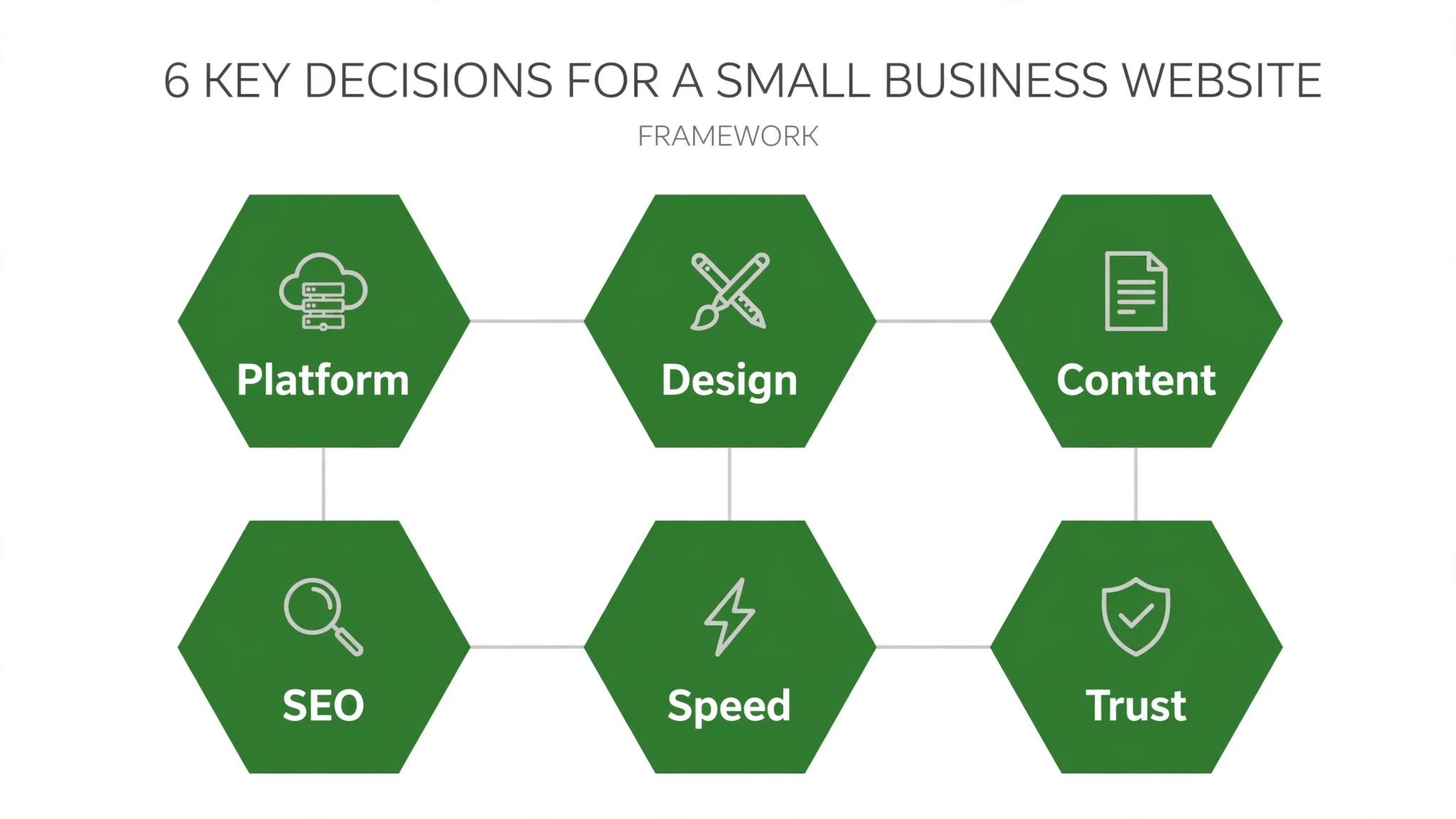
Strip away the noise and a small business website succeeds or fails on six decisions. Each one is covered in depth in its own guide — this is the map. This is the core of professional web design and development services: decisions made deliberately, not by accident.
1. What the design actually prioritizes
Most small business sites fail on priorities, not talent. They invest in looking impressive and underinvest in being clear: what you do, who it’s for, and what to do next, visible without scrolling. Our breakdown of what actually matters in small business website design gives you the 2026 short list — and the expensive extras you can safely skip.
2. The platform: WordPress vs Shopify
This is the decision owners agonize over most, and it’s simpler than it feels. It’s not a technology question; it’s a business-model question. Sell products online as your core business? That points one way. Generate leads for services and publish content to earn trust? That points the other. Our WordPress vs Shopify decision framework walks through the seven questions that settle it, plus what switching platforms later actually involves.
3. Knowing when it’s time to rebuild
Here’s the uncomfortable truth: most small businesses keep a dying website two years too long. The signs are never subtle once you know them — pages that take forever to load, a contact form nobody can find, copy describing services you stopped offering in 2022. Our website redesign checklist covers 21 signs it’s time, organized so you can score your own site in an afternoon.
4. Landing pages that convert
Your homepage introduces you. Your landing pages close the deal — every ad, every campaign, every “learn more” click lands somewhere, and that somewhere either converts or wastes the click. The anatomy is well understood: headline, proof, friction-free form, mobile-first layout. Our guide to landing page design that converts breaks it down section by section.
5. Speed and Core Web Vitals
Page speed is one of the few things that is simultaneously a Google ranking factor, a user-experience factor, and a conversion factor. Google even tells you exactly how it measures it: LCP, INP, and CLS. Our plain-English guide to Core Web Vitals and page speed explains what each metric means, how to check your own site, and the fixes in priority order.
6. Designing for local customers
A local business website has a different job than a national one. Visitors want three things: proof you’re legitimate, confirmation you’re nearby, and the fastest possible path to contacting you. Reviews, service-area clarity, tap-to-call, real photos — our guide to web design for local businesses shows how to turn the site into a lead machine.
What a Proper Engagement Looks Like, Start to Finish
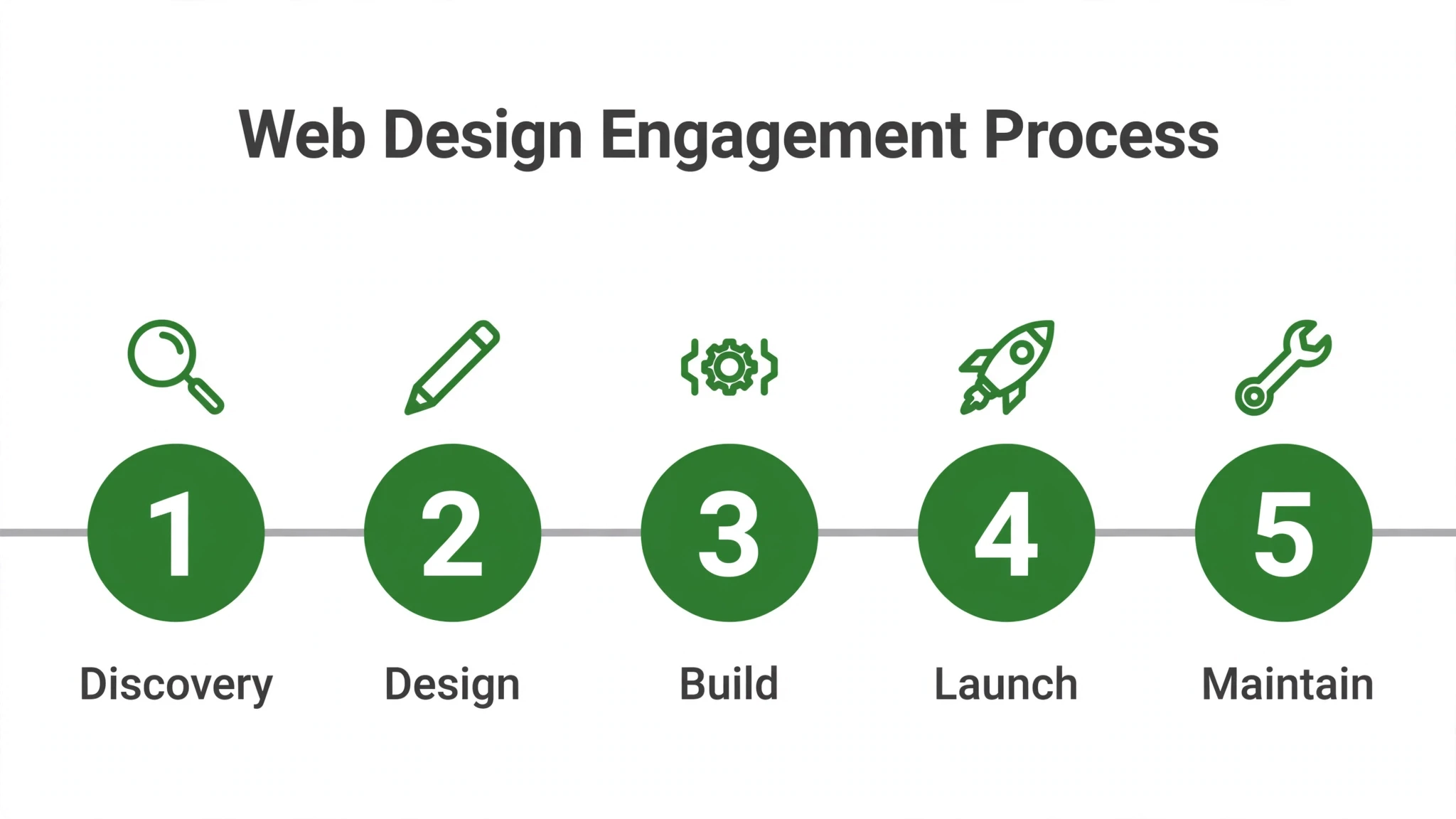
Knowing the process protects you. A professional engagement follows a sequence, and each phase has a deliverable you can point to. If a proposal can’t name its phases, there’s no process behind it. Any web design and development services proposal worth signing names its phases, its deliverables, and its support terms.
- Discovery. — The team learns your business: goals, customers, competitors, what the site must accomplish. Deliverable: a written brief both sides sign off on.
- Architecture. — Sitemap and page-by-page content plan — what each page says and what action it drives. Deliverable: the sitemap.
- Design. — Homepage and key templates designed first, the rest after you approve the direction. Deliverable: full-page designs, not mood boards.
- Copy and content. — Real copy written or placed into the designs. Sites designed around placeholder text always need redesign when real words arrive.
- Development. — The approved designs built as a fast, responsive, secure site on the agreed platform.
- QA and launch. — Tested on real phones and browsers, forms submitted and confirmed, redirects mapped from the old site, analytics connected.
- Post-launch. — Monitoring, updates, backups, and a plan for ongoing improvement. Launch day is the starting line, not the finish.
| Phase | What you should expect to see | Warning sign |
|---|---|---|
| Discovery | Written brief, defined goals, agreed sitemap | They start designing in week one with no questions |
| Design | Full pages in your actual content, mobile views included | Only desktop mockups; mobile “handled later” |
| Development | Staging link you can click through as it’s built | You see nothing until “it’s done” |
| Launch | QA checklist, redirect map, analytics live | Site goes live Friday night with no testing window |
| After launch | Support plan with response times | “Just email us if anything breaks” and silence |
How to Judge a Web Design Partner
You’re not buying a website. You’re buying judgment about the six decisions above, applied to your business. Here’s how to tell who has it:
- Look at shipped work, not mockups. — Ask to see live sites they’ve built and visit them on your phone. Slow, clunky, or broken on mobile tells you everything.
- Ask what they measure. — A serious team talks about load times, conversion paths, and search visibility — not just how the site looks.
- Ask about their process. — They should describe something close to the seven phases above without prompting.
- Ask who owns what after launch. — Updates, backups, small changes — get the support arrangement in writing before you need it.
- Ask how they handle content. — If the plan is “you send us the copy whenever,” expect delays measured in months.
- Ask about speed specifically. — What do they target for load times? How do they test? Vague answers here mean it isn’t a priority for them.
- Check that they build for your customer, not their portfolio. — The trendiest site in their portfolio might be the worst-converting. Ask what each design choice is for.
The Real Cost of a Bad Website
Owners usually frame a website as a cost. The more useful frame: a bad website is a cost you keep paying. Every ad click that lands on a slow, confusing page is money spent to impress nobody. Every visitor who can’t find your phone number is a lead that went to the competitor whose number was thumb-reachable. Every month you avoid sending people to your own site — because you’re slightly embarrassed by it — is a month your best marketing asset sits idle.
A good website reverses all of that quietly: it answers the questions your sales conversations keep repeating, it captures the leads that arrive after hours, and it makes every other marketing dollar work harder because the destination finally deserves the traffic. That is what well-executed web design and development services deliver: a site that makes every marketing dollar work harder.
Anatomy of a Homepage That Earns Its Keep
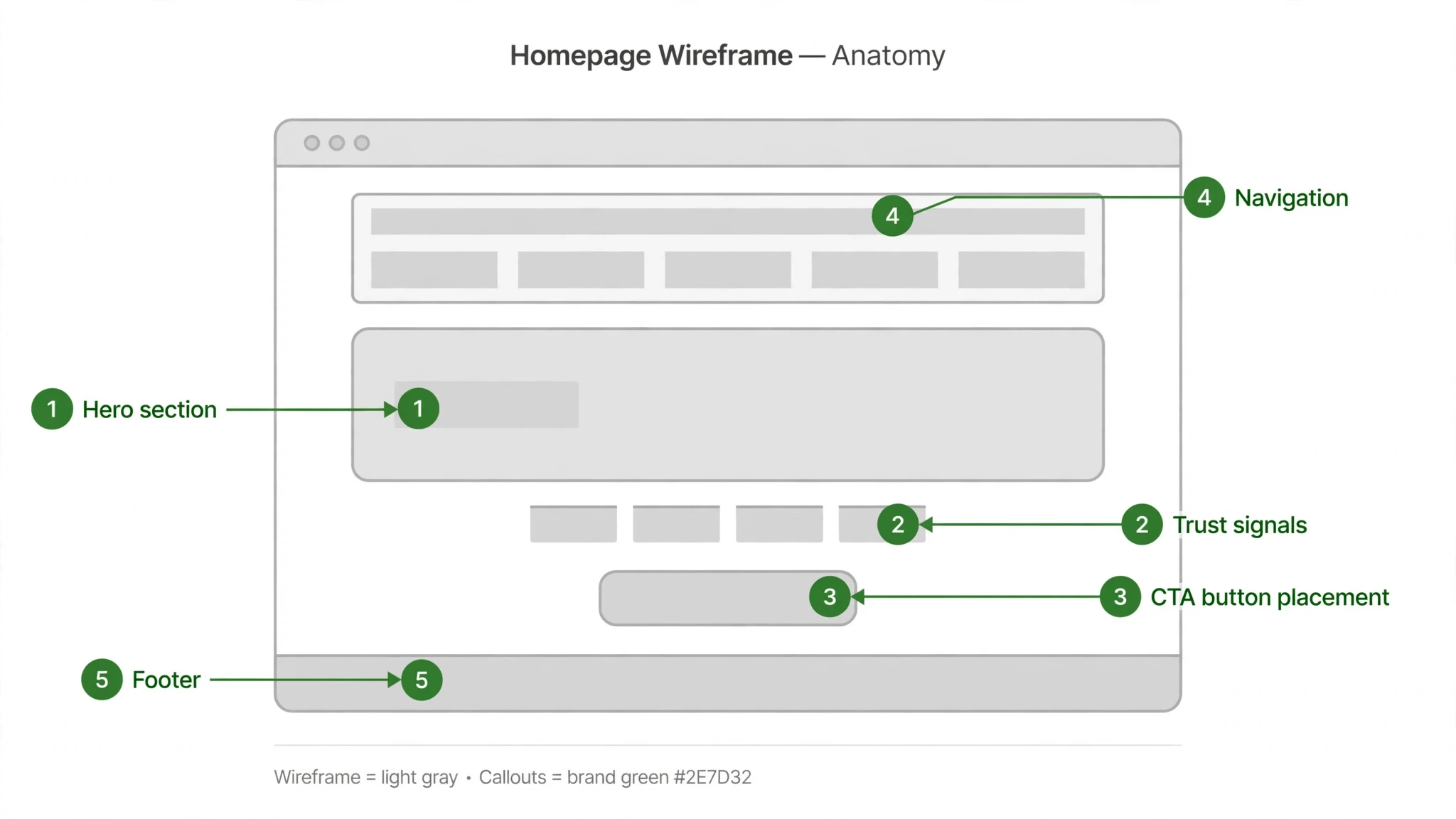
The homepage is the page most small business owners obsess over and the page most visitors spend the least time on. That sounds contradictory until you realize the homepage’s job isn’t to be read — it’s to route. A visitor lands, decides in seconds whether you’re relevant and trustworthy, and clicks toward the page that actually sells them. Every block on the homepage should earn its place against that job:
| Homepage block | Its job | The common mistake |
|---|---|---|
| Header and navigation | Get visitors to the right page in one click; show the phone number | Seven vague menu items like “Solutions” and “Resources” that say nothing |
| Hero section | State what you do, for whom, and what to do next — above the fold | A clever headline that needs explaining, with the CTA buried below |
| Trust bar | Logos, review stars, or credentials that borrow credibility fast | Skipped entirely, or filled with awards nobody recognizes |
| Services preview | Route visitors to the service page that matches their need | A wall of text describing everything at once |
| Proof section | Testimonials or results that answer “does this work for people like me?” | Generic praise with no names, no specifics, no faces |
| About teaser | Humanize the business in two sentences with a real photo | Stock photo of a handshake and a paragraph about “passion” |
| Local signals | Service area, address, hours — the facts local buyers check | Hidden on a contact page three clicks deep |
| Footer | Second navigation, contact details, trust recap | Treated as decoration instead of a conversion safety net |
Notice what’s missing from that table: sliders, autoplay video, animated counters, parallax effects. None of them route, reassure, or convert. They’re the reason so many small business homepages feel busy and say nothing. When we rebuild a homepage, the first pass is always subtraction — and the conversion path gets clearer every time something decorative leaves.
Maintenance: The Part Everyone Forgets
A website is not a project with an end date; it’s an asset with a maintenance schedule. Unmaintained sites don’t stay the same — they decay. Plugins go out of date, links break, the team photo still shows someone who left two years ago, and the “latest news” post is old enough to vote. Visitors notice, even if they can’t name what’s wrong. The site just feels neglected, and neglected doesn’t get the inquiry.
The maintenance load for a small business site is modest, but it has to be someone’s actual job. Here’s the quarterly routine we recommend:
- Update the platform, theme, and plugins — then check that nothing broke in the process.
- Confirm the backup system actually works by verifying a recent backup exists and restores.
- Walk the site on a phone: submit every form, tap every CTA, check every page loads fast.
- Review the content for staleness — services, team, testimonials, hours, service area.
- Check search visibility basics: is the site still indexed, are there new crawl errors, did rankings on core terms move?
- Look at the numbers that matter: contact form submissions, calls from the site, and which pages produce them.
That last item is the one that turns maintenance from a chore into a growth habit. A site you measure gets improved; a site you ignore gets rebuilt from scratch every four years at multiples of what steady care would have cost. Build the routine in from day one and the site compounds instead of crumbling. The best web design and development services build this maintenance routine into the engagement from day one.
DIY, Freelancer, or Agency: Choosing Your Build Path
Not every small business needs an agency engagement, and an honest guide should say so. The right build path depends on where your business is and what the site has to do.
DIY builders make sense when the site is simple, the budget is tight, and someone on your team will actually maintain it. A basic brochure site with your services, your story, and a contact form can be built well on a modern platform in a focused week. The risk isn’t the tool — it’s the follow-through. Most DIY sites stall at “good enough to publish” and never get the speed work, the conversion thinking, or the content depth that make a site produce.
A freelancer fits when you know exactly what you want and can manage the project yourself. You’ll get strong execution at a reasonable scope — one skilled person designing and building to your spec. The tradeoff is breadth: one person rarely covers strategy, copy, design, development, and SEO foundations at equal depth, so be clear about which of those you’re supplying. Full-scope web design and development services cover all three; partial help means you supply the rest.
An agency engagement fits when the website is a growth channel, not a checkbox — when you’re spending on marketing that points at the site, when leads from the site would change your revenue, or when the project spans strategy, content, design, and development and you don’t want to coordinate it. You’re buying the process and the accountability, not just the pages. That process and accountability are what separate real web design and development services from page factories.
Whichever path you take, the six decisions in this guide don’t change. They just change who makes them — and whether they get made deliberately or by accident.
Why Web Design and Development Services Compound Over Time
A website is one of the few marketing investments that keeps working after you stop paying attention to it. Good web design and development services build that compounding effect in from the start: every page is structured so search engines can find it, every form is placed where a motivated visitor will actually use it, and the underlying code stays fast as you add content. Month after month, that foundation turns routine traffic into a steadier flow of inquiries without requiring a bigger ad budget to compensate.
The opposite compounds too. Web design and development services done cheaply tend to produce sites that slow down as plugins pile up, break on new phones, and quietly leak the rankings they once had. Each year of patching costs more than the last, and eventually the business faces the same rebuild it tried to avoid — only now with lost momentum. That is why experienced teams treat web design and development services as infrastructure rather than decoration: the goal is a site that gets more valuable the longer it runs.
When you evaluate web design and development services, ask how the team designs for year two and year three. Do they build on a platform you can extend without rebuilding? Do they document the site so the next person who touches it is not starting blind? Do they measure speed and conversions after launch, not just at handoff? The answers tell you whether you are buying a website or buying a compounding asset. Choose web design and development services that plan for the long run, and the site stops being a cost center and starts behaving like one of your best-performing employees.
Where to Start
Start with an honest look at where you stand. Run through the 21-sign redesign checklist and check your speed against the Core Web Vitals benchmarks. If the site fails on fundamentals, a redesign done right — strategy first, speed baked in, built to convert — pays back faster than another year of patching. Done right, web design and development services pay back faster than another year of patching.
If you want a team that treats your website like the revenue asset it is, see how we design and build websites, then reach out through our contact page and tell us about your project. We’ll tell you straight whether you need a full rebuild or a focused fix — and exactly what we’d do first.
Frequently Asked Questions
One accountable point of contact who owns both design and performance tradeoffs — that is the practical test of the one-service model. They should translate technical calls on load time and platform choice into business consequences you can judge. If design and development report separately, the handoff gaps become your problem.
The handoff is where projects die: designers make choices that add page weight, and developers inherit layouts that can't be built fast. Each side blames the other while the site gets slower and the timeline slips. One team accountable for both look and performance makes the tradeoffs correctly.
Ask what the migration actually involves: content porting, redirect mapping from the old URLs, and which integrations you'll lose or need to rebuild. Switching platforms mid-life is often more expensive than building right the first time, so weigh the cost of staying against the real cost of moving. Let the decision follow your business model, not a trend.
Start with the conversion path: can a visitor tell what you do and contact you within seconds? Then fix speed and mobile, then trust signals like reviews and real photos. Rank every fix by whether it helps a visitor decide or just pleases your eye — revenue first, polish last.
Patching works when the foundation is sound: the platform is current, the structure makes sense, and the issues are isolated to speed or copy. Rebuilding wins when the platform is obsolete, the architecture fights your goals, or every patch costs more than the last. The test is simple — if you're embarrassed to send people to the site, patching won't fix that.
Beware proposals that start designing in week one with no discovery, show only desktop mockups, or promise a site with no testing window before launch. Another red flag is no written support terms — 'just email us if anything breaks' is a maintenance plan of silence. A real proposal names phases, deliverables, and who owns what after launch.
A website is a living asset, and unmaintained sites decay — software needs updates, backups need monitoring, and small fixes pile up. Support after launch keeps the site fast, secure, and accurate as your business changes. Any proposal that ends the day the site goes live is selling you a product, not a service.
Your homepage introduces you; your landing pages close the deal. Every ad, every campaign, and every 'learn more' click lands somewhere, and that somewhere either converts or wastes the click. A proper site architecture treats landing pages as dedicated conversion assets — headline, proof, friction-free form, mobile-first layout — not as afterthoughts.
Page speed is simultaneously a Google ranking factor and a conversion factor. Slow pages rank worse and lose visitors who go back to the search results and pick a competitor. Google's Core Web Vitals give you the exact metrics to measure, and image compression, caching, and code cleanup are the standard levers.
It prevents building pages nobody needs and missing the ones that sell. Discovery sets the goals and audience, and architecture turns them into a sitemap and a page-by-page content plan before any design starts. Skipping it is how businesses end up with a beautiful site that lacks the pages that would have made it money.