


Updated: September 2026 · By the KKeyQik Team
Most small business websites try to do too much. They pack in sliders, animations, and five different calls to action — and then wonder why visitors leave without contacting anyone. The honest definition of small business website design in 2026 is simpler than most agencies admit: a website that states clearly what you offer, loads fast on a phone, looks trustworthy, and makes contacting you effortless. Everything else is a supporting act. That hierarchy is the heart of effective small business website design.
We have rebuilt and reviewed websites for businesses of every size, and the pattern is consistent: the sites that generate leads are rarely the prettiest ones. They are the clearest ones. This guide breaks down the short list of what actually matters in 2026, what you can safely stop over-investing in, and the order to tackle improvements so every hour of effort moves the needle.
Key Takeaways
- Your above-the-fold area should answer three questions in seconds: what you do, who it is for, and what to do next.
- Load speed and mobile usability are non-negotiable — most of your visitors will first meet you on a phone.
- Trust signals like real reviews, real photos, and real credentials do more heavy lifting than any design trend.
- Basic on-page SEO structure (clear headings, descriptive titles, one topic per page) keeps you findable without a massive investment.
- Every page should have one primary path to contact — not three competing buttons fighting for attention.
1. Offer Clarity Above the Fold
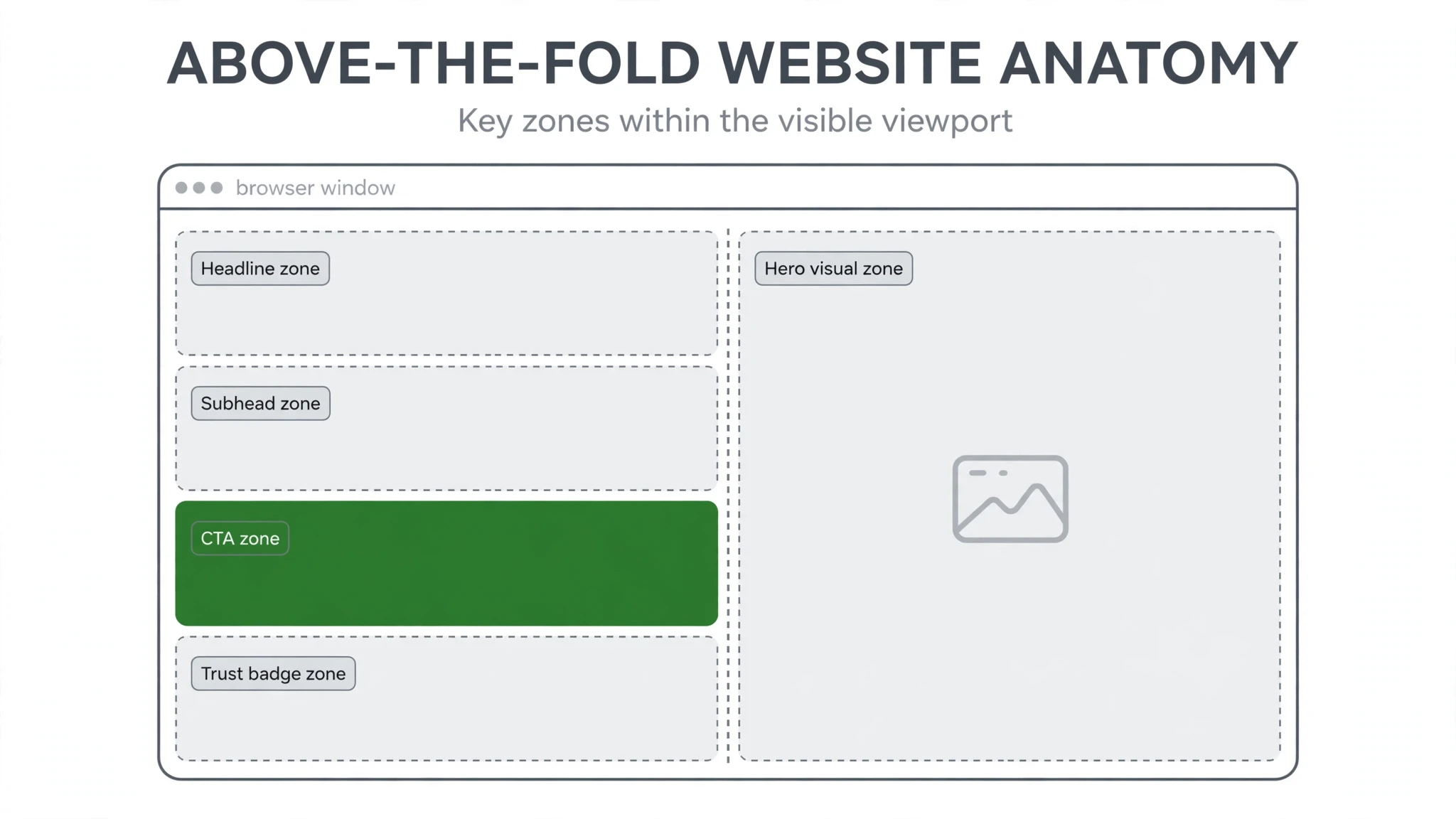
When someone lands on your homepage, they make a decision in seconds: am I in the right place? If your headline is vague — “Welcome to Our Website” or “Excellence Through Innovation” — you have lost them before they scroll.
Above the fold, your visitor needs three answers instantly:
- What you do — plain language, no jargon. “Residential plumbing in the Denver area” beats “holistic home water solutions.”
- Who it is for — help the right visitor self-identify. If you serve homeowners and commercial clients differently, say so.
- What to do next — one clear action: call, request a quote, book an appointment.
This is the single highest-leverage fix on most small business websites. We have seen pages double their inquiries from a headline rewrite alone — not because headlines are magic, but because the old ones said nothing. Write your headline, then ask a friend outside your industry what they think you sell. If they hesitate, rewrite it.
2. Load Speed and Mobile Experience
Most of your potential customers will first visit your site on a phone, often on a mediocre connection. A page that takes too long to appear feels broken — and people do not wait for broken things. They go back to the search results and pick your competitor.
Speed and mobile experience are not technical luxuries. They are the foundation everything else sits on. Here is what actually moves the needle:
- Compress images — oversized photos are the most common reason a page loads slowly. Resize them to the dimensions they actually display at and compress before uploading.
- Trim plugins and scripts — every chat widget, pop-up tool, and tracking pixel adds weight. Keep only what earns its place.
- Design mobile-first — your phone layout is not a shrunken desktop. Buttons need to be thumb-tappable, text needs to be readable without pinching, and forms need to be short.
- Test on a real phone — not just in your browser’s preview mode. Load the site on your actual device over cellular data and scroll through it like a customer.
You do not need a perfect score on every performance tool. You need pages that feel instant to a real visitor holding a real phone.
3. Trust Signals: Reviews, Real Photos, Credentials
People buy from businesses they trust, and your website has to build that trust in minutes without you in the room. The strongest trust signals are also the cheapest to add:
- Real reviews — a handful of genuine, specific customer reviews placed near your calls to action. Specificity matters: “They fixed our water heater the same day they quoted it” convinces more than “Great service!”
- Real photos — photos of your actual team, your actual work, and your actual location. Visitors can spot stock photography instantly, and it quietly tells them you are hiding something.
- Real credentials — licenses, certifications, years in business, guarantees, association memberships. Anything verifiable that says “we are legitimate.”
- Real contact details — a real address, a real phone number, real names. Sites that hide behind a contact form alone feel like they might disappear tomorrow.
Notice what is not on this list: awards you invented, partner logos of companies you barely work with, and vague claims about being “the best.” Trust comes from specifics, not superlatives.
4. Findability: Basic On-Page SEO Structure
A beautiful website that nobody finds is an expensive brochure. You do not need an advanced SEO program to be findable — you need a clean structure that search engines can understand:
- One topic per page — your services should each have their own page with a clear, specific title. A page titled “Our Services” that lists twelve offerings ranks for none of them.
- Descriptive titles and headings — your page title and H1 should say what the page is about in plain language, using the words customers actually search for.
- Helpful, readable copy — write for humans first. Explain what you do, who you serve, and what happens next. Search engines have gotten very good at rewarding pages that genuinely answer questions.
- Internal links — link your pages to each other where it helps the visitor: service pages linking to related services, blog posts linking back to relevant service pages.
This is the small core of SEO work that produces most of the value for a small business. Get the structure right now, and deeper SEO work later builds on a solid foundation instead of fixing a broken one. That solid foundation is what small business website design is really about.
5. One Clear Path to Contact
The job of your website is not to be admired. It is to turn a visitor into a conversation. And yet most small business sites give visitors three, four, or five competing options — call us, fill out this form, sign up for the newsletter, download the guide, chat with us now — and the result is that visitors do none of them.
Pick one primary action and make it unmissable:
- Put it in the header of every page.
- Repeat it after every major section of your homepage and service pages.
- Make the form short — name, contact info, and one question about what they need. Every extra field costs you completions.
- On mobile, make the phone number tappable and prominent.
Secondary actions (newsletter, social links) can exist, but they should never compete visually with the primary one. One path, made obvious, converts better than five paths competing for attention.
What to Stop Over-Investing In
Now the other side of the ledger. These are the things that consume design budgets while adding little or nothing to leads and sales:
Trendy Animations and Effects
Parallax scrolling, text that fades in word by word, hover effects on every element. They look impressive in a portfolio and mildly annoying on a real business site. Worse, they slow pages down and distract from the one thing you want the visitor to do. Motion should serve a purpose — drawing attention to your call to action, guiding the eye through a process — or it should not exist.
Autoplay Video Backgrounds
That full-screen video of a city skyline behind your headline? It adds seconds to load time, often fails to play on mobile, and says nothing about your business. A sharp, relevant still image with a clear headline outperforms it every time.
Giant Image Sliders
Sliders rotate through five messages because a business could not decide which one mattered. Visitors see the first slide — if they see anything — and never wait for the rest. Pick your strongest message and make it the headline. Delete the slider.
Stock-Photo-Heavy Pages
Pages full of smiling-people-in-a-meeting stock photos actively hurt trust. Visitors have seen these same images on a hundred other sites. Replace them with real photos of your team and your work — even phone photos of real work beat polished photos of strangers.
Where to Focus First: The Prioritization Table
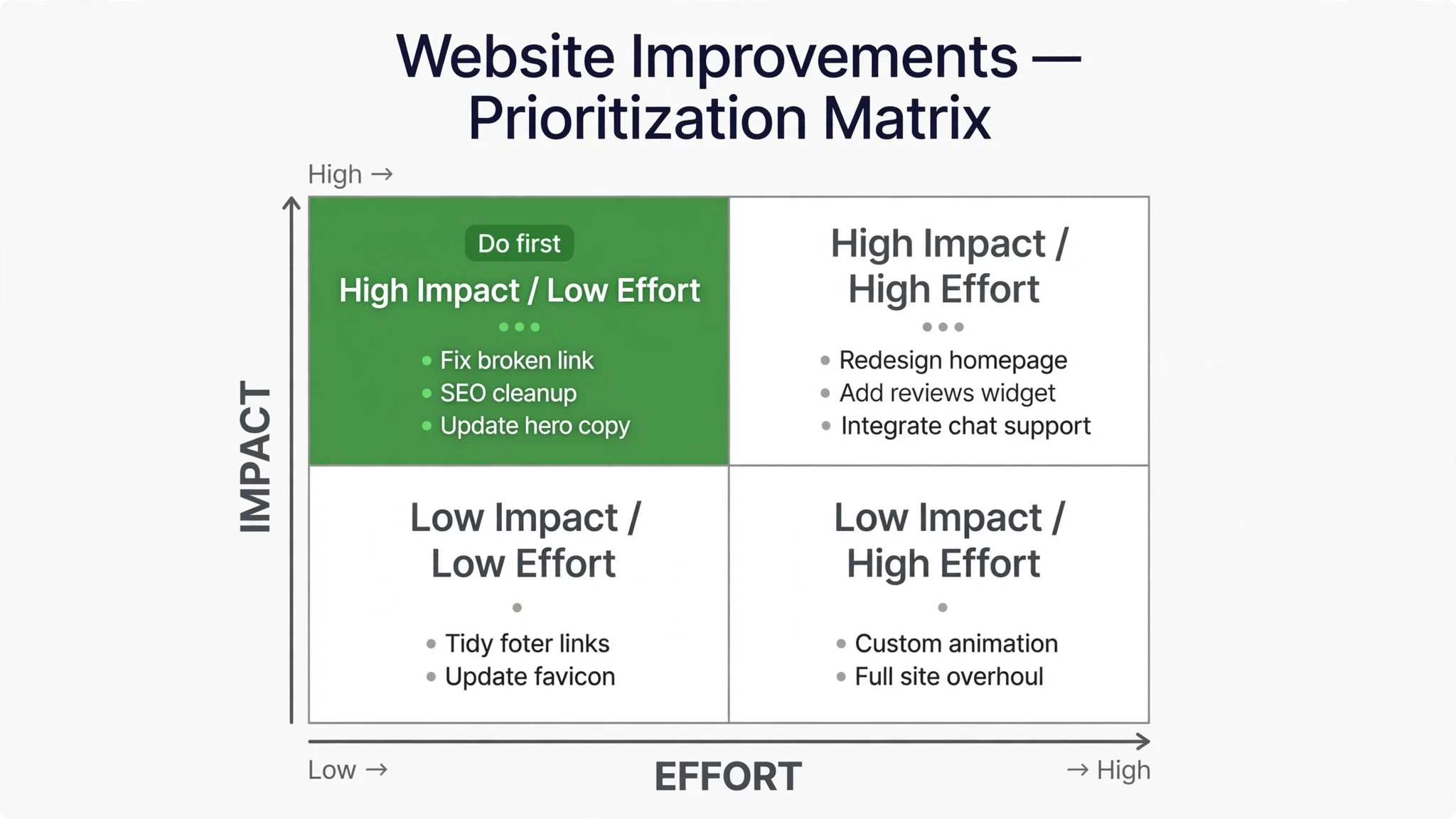
Not everything on the list carries equal weight. Use this table to decide where your effort goes first:
| Priority | What It Is | Why It Matters First | Typical Effort |
|---|---|---|---|
| 1. Offer clarity | Rewrite headlines and above-the-fold copy | A confused visitor never converts, no matter how fast or pretty the site is | Low |
| 2. Contact path | One primary CTA, short forms, tappable phone number | Captures the demand your clarity creates | Low |
| 3. Speed and mobile | Compress images, trim bloat, test on a real phone | Most visitors arrive on mobile; slow pages lose them before they read a word | Medium |
| 4. Trust signals | Reviews, real photos, credentials, real contact details | Turns a visitor who understands you into a visitor who believes you | Medium |
| 5. On-page SEO | One topic per page, descriptive titles, internal links | Compounds over time; builds on everything above | Medium |
| Deprioritize | Animations, sliders, autoplay video, stock-photo galleries | Consume effort without moving leads or sales | High |
Notice the order: clarity and contact capture come before polish. A plain, fast site that clearly says what you offer and makes contacting you easy will outperform a beautiful, slow, confusing one every single time. That is the bet good small business website design makes: clarity and speed over decoration.
Roll Out Improvements in Order
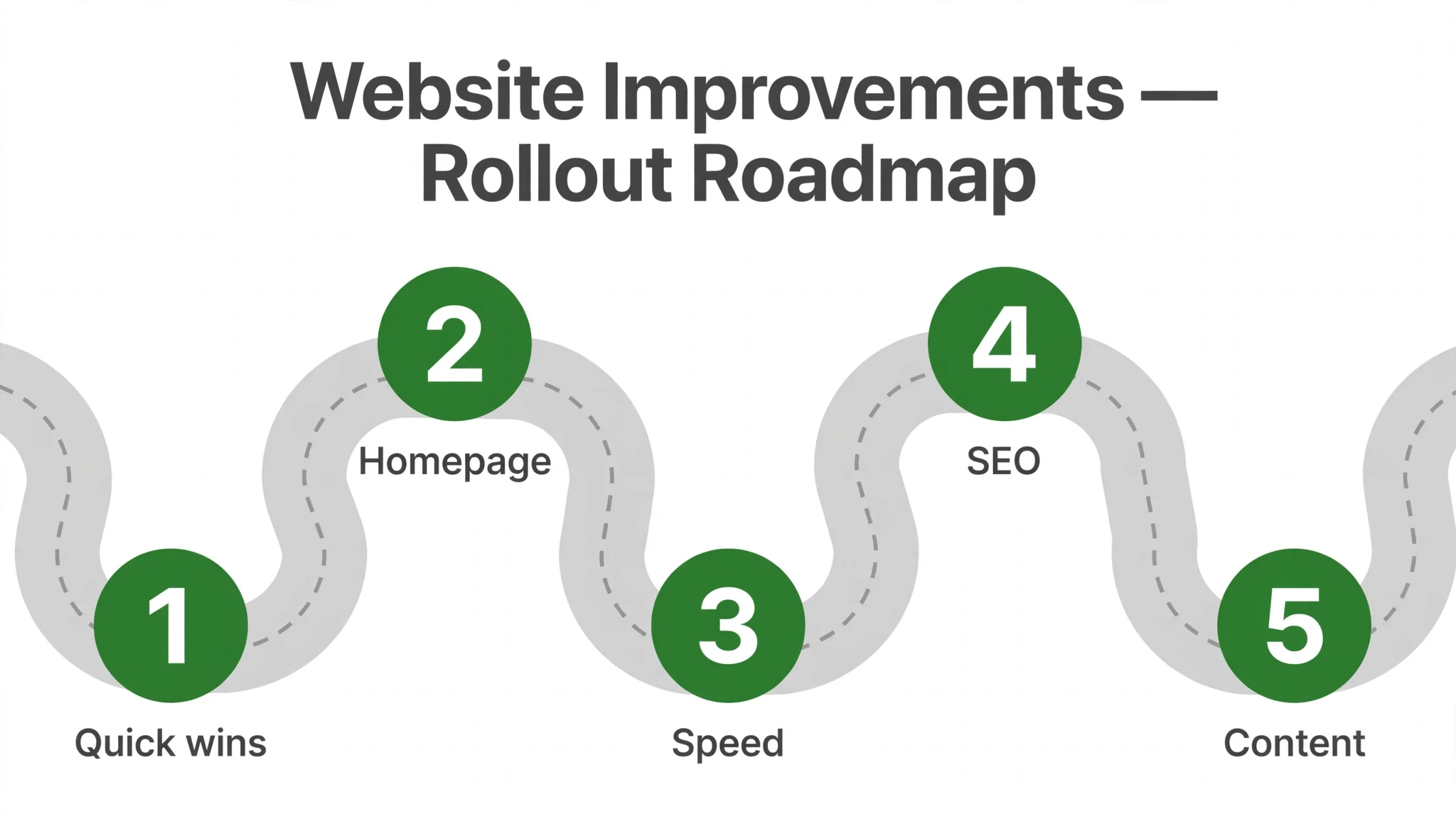
Here is the sequence we recommend. Do them in this order, and do not skip ahead — each step makes the next one more effective:
- Rewrite your homepage headline and subhead so they answer what you do, who it is for, and what to do next. Test it on someone outside your industry.
- Simplify your contact path. Choose one primary action, put it in the header, repeat it down the page, and shorten your form to the essentials.
- Speed up the site. Compress every image, remove plugins and scripts you do not need, and load the site on your phone over cellular data. Fix what feels slow.
- Add trust signals. Place your best reviews near your calls to action, swap stock photos for real ones, and list your credentials and real contact details prominently.
- Fix your page structure. Give each service its own page with a descriptive title and H1, write helpful copy for humans, and link related pages together.
- Remove the distractions. Delete the slider, kill the autoplay video, strip the pointless animations. Every element you remove makes the remaining ones work harder.
Work through this list and your website will not just look better — it will work better. That is the whole point of small business website design: not a prettier site, but a site that earns its keep.
Small Business Website Design on a Realistic Timeline
One reason small business website design projects stall is that owners try to fix everything at once. A realistic timeline treats the five fundamentals — clarity, speed, trust, findability, and one path to contact — as a sequence, not a single launch. Weeks one and two usually go to offer clarity: rewriting the headline, tightening the hero, and making the primary action unmissable. Small business website design done in this order shows results early, which keeps momentum up for the harder technical work.
Weeks three and four belong to speed and mobile: compressing images, removing dead plugins, and testing every key page on an actual phone. Then trust signals get their pass — real photos replace stock, reviews get placed near decision points, and credentials move above the fold where they belong. The final stretch of a small business website design refresh covers findability: one keyword theme per page, descriptive titles, and internal links that guide both visitors and search engines.
The whole sequence fits inside a month of focused effort, and each phase makes the site measurably better even if you pause between them. That is the real advantage of approaching small business website design as a prioritized rollout: you never have to bet the business on a big-bang relaunch, and every week ends with a site that converts a little better than the week before.
Wrap-Up
Small business website design advice in 2026 is noisy because the design industry sells novelty. But small businesses do not need novelty — they need clarity, speed, trust, findability, and one obvious path to contact. Get those five right, stop paying for the distractions, and your website becomes what it was always supposed to be: a quiet, reliable engine that turns visitors into customers. That is the job description of good small business website design.
This article is part of our guide to web design and development services for small business.
Ready to make your website work harder? Reach out through our contact page and tell us where your site stands today — we will talk through what to fix first.
Frequently Asked Questions
Three things, all above the fold: what you do, who it's for, and what to do next. 'Residential plumbing in the Denver area' beats 'holistic home water solutions,' and one clear action — call, request a quote, book an appointment — beats five competing buttons. If a friend outside your industry can't tell what you sell from your headline, rewrite it.
Use plain language and the words customers actually search for, not industry jargon or vague inspiration. The headline's job is to make the right visitor think 'I'm in the right place' in seconds. We've seen pages double their inquiries from a headline rewrite alone — not because headlines are magic, but because the old ones said nothing.
Most of your potential customers will first visit your site on a phone, often on a mediocre connection. A page that takes too long to appear feels broken — and people don't wait for broken things. They go back to the search results and pick your competitor, so speed is the foundation everything else sits on.
Compress images — oversized photos are the most common reason pages load slowly — resize them to the dimensions they display at, and trim plugins and scripts so only what earns its place stays. Design mobile-first rather than shrinking a desktop layout, and test on a real phone over cellular data. You don't need a perfect score on every performance tool; you need pages that feel instant to a real visitor.
Real reviews placed near your calls to action — specific ones, like 'They fixed our water heater the same day they quoted it,' beat generic praise. Add real photos of your team, work, and location, verifiable credentials like licenses and certifications, and real contact details including an address and phone number. Trust comes from specifics, not superlatives.
Visitors can spot stock photography instantly, and it quietly tells them you might be hiding something. Real photos of your actual team, your actual work, and your actual location are among the cheapest and strongest trust signals available. Invented awards and vague 'best in the business' claims do the opposite of building trust.
One topic per page — each service gets its own page with a clear, specific title, because a page titled 'Our Services' that lists twelve offerings ranks for none of them. Add descriptive titles and headings in the words customers actually search for, helpful readable copy written for humans first, and internal links between related pages. That small core produces most of the SEO value for a small business.
One primary path to contact. The job of your website is to make contacting you effortless, and three competing buttons fight for the visitor's attention instead of guiding it. Every page should funnel toward a single clear next step.
Sliders, animations, and multiple competing calls to action. Most small business sites try to do too much — they pack in motion and options and then wonder why visitors leave without contacting anyone. The sites that generate leads are rarely the prettiest ones; they're the clearest ones. Put the effort into clarity, speed, and trust instead.
A focused pass fits inside about a month: a week or two on headline and contact-path fixes, then speed and trust signals, then page structure. The key is doing them in order so each phase makes the next more effective. Even if you pause between phases, the site ends every week a little better than it started.