

Introduction
On Monday, 16 November 2026, visitors to some of the most visited websites on the internet were handed malicious code along with the page they asked for. Zoom, the BBC, CNN, Salesforce, GitLab, IKEA, HSBC, Equifax, Air France-KLM, Ledger and Peacock were among the names affected. None of those organisations had their own systems broken into. The code arrived through a file they all deliberately load from Optimizely, the A/B testing platform marketers use to try out different versions of a page.
That is what makes the Optimizely cyberattack a marketing story, not just a security story. The tool at the centre of it sits on the marketing side of the business. It is the kind of script a marketing team adds to a site without a second thought, because it powers experiments, personalisation and conversion testing. On 16 November, that ordinary marketing tool became the delivery route for a crypto wallet swapper, a card skimmer, a cookie thief and an iPhone exploit kit — all served from a domain every affected site already trusted, over a valid security certificate, inside a file that looked exactly like the testing snippet it had always been.
The numbers behind the Optimizely cyberattack are stark. Security researcher Scott Helme of Report URI, who first documented the incident, checked 1,611 Optimizely snippets and found malicious code in 188 of them, belonging to 178 organisations. By 19:25 UTC on 16 November, wallets tied to the attack had received roughly $7,040 in cryptocurrency. How many card numbers were captured, and how much other browser data reached the attackers before the code was removed, is still unknown.
Optimizely confirmed the incident on its status page at 01:02 UTC on 17 November, saying an unauthorised party had exploited a vulnerability in its Experimentation account signup flow, and that it had fixed the flaw, removed the injected code and contacted affected customers directly.
For a small business, the scale of the Optimizely cyberattack can feel remote. Your site does not get Zoom’s traffic, and you probably do not run Optimizely. But the lesson of the Optimizely cyberattack has nothing to do with scale. It is about trust — specifically, about how much of your brand’s trust now rests on tools you did not build, code you did not write and vendors you have never met. A visitor who types their card details into your checkout page is trusting you. If a third-party script on that page is compromised, that trust breaks, and the visitor will not blame the vendor. They will blame you.
This post explains what happened in the Optimizely cyberattack in plain terms, why it matters to marketers rather than only to security teams, and seven brand trust lessons any business can put to work — starting this week.
What Happened in the Optimizely Cyberattack
Optimizely Web, also sold as Optimizely Web Experimentation, is an A/B testing and personalisation product. A website adds one script tag, called a snippet, and that file carries Optimizely’s own code, the site’s experiments and an optional field called Project JavaScript — custom code the customer writes in the Optimizely dashboard, which runs on every page of the site.
According to Report URI, the attacker wrote a small loader into the Project JavaScript of many unrelated customer projects and left the rest of each snippet untouched. Every visitor to an affected page then downloaded the snippet from Optimizely’s content delivery network, ran the loader, and pulled a second-stage script, known as track.js, from the attacker’s domain. The file was still served from cdn.optimizely.com with Optimizely’s certificate, from a host every affected site already trusted. Nothing about the delivery looked wrong to the browser, to the site or to the visitor.
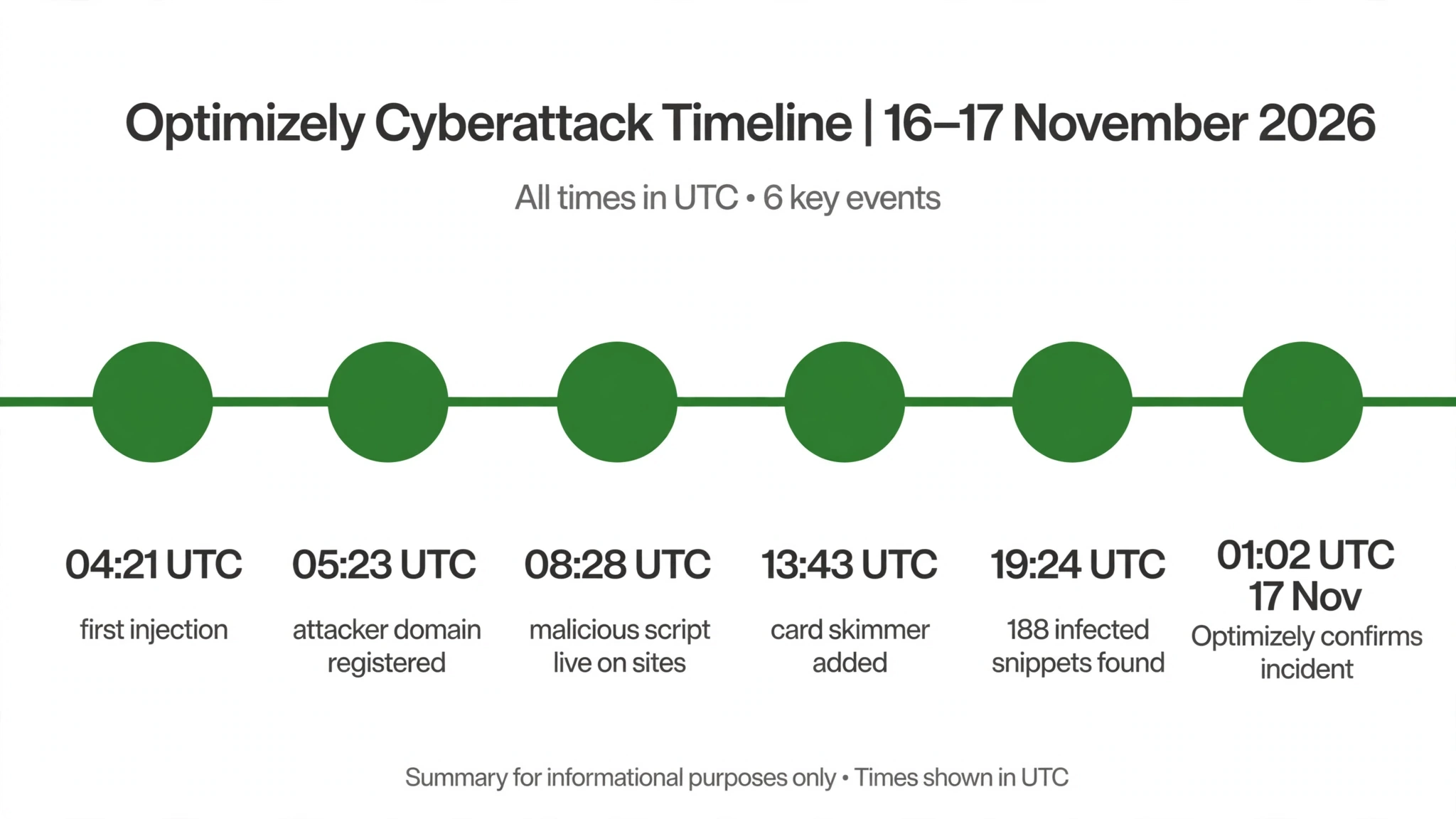
The timeline, as reported by Report URI, shows how fast the day moved. The first Optimizely injection was observed at 04:21 UTC on 16 November. The attacker’s domain was registered at 05:23 UTC. The first build of track.js appeared at 08:10 UTC, and the script was first seen on a live site at 08:28 UTC.
Stolen cryptocurrency was swept to exchanges between 13:03 and 13:05 UTC. A card skimmer was added to the payload at 13:43 UTC — more than nine hours after the first injection.
By the time Report URI ran its sweep between 19:24 and 19:59 UTC, 186 of the 1,611 snippets it checked were infected. A mass cleanup followed in the evening, and by 21:52 UTC only one of the 188 infected snippets still carried the code. Optimizely’s status page entry, posted at 01:02 UTC on 17 November, confirmed the incident and said the vulnerability was fixed and the injected code removed.
The payload itself was a multi-purpose kit, and every part of it was active at once. It swapped cryptocurrency wallet addresses — for Bitcoin, Ethereum, TRON, Solana and several others — replacing the address a visitor saw on the page, in forms, on the clipboard and even in the iOS share sheet, so that funds went to the attacker instead of the intended recipient.
From 13:43 UTC it also captured card numbers, expiry dates and security codes typed into a site’s own forms, and sent them to the attacker’s server. When it swapped an address near wallet or payment wording, it also sent the page address, cookies that page scripts could read, and a screenshot of the page.
On iPhones and iPads, it loaded one of two known exploit kits — Coruna for older iOS versions and DarkSword for iOS 18 — aimed at devices that had not yet installed the patched releases.
The attacker kept improving the payload while it was live. Report URI counted 26 rebuilds of track.js during the day. The campaign has been dubbed OPTIMJACK by independent researchers. No threat actor has been publicly named, and Optimizely has not yet published a full account of how the signup-flow vulnerability was used to reach customer projects. BleepingComputer independently analysed copies of the modified files and confirmed the script loaded, or tried to load, on sites including Zoom, KLM, GitLab, the BBC, CNN, Smartsheet and Salesforce.
One detail from Report URI’s investigation deserves attention from every marketer. The firm crawled 256 of the affected organisations’ own hosts and tested their Content Security Policy — the browser rule that controls which scripts a page is allowed to run. Only 24 of them blocked the payload. Allowing the vendor’s host in that policy did not help, because the malicious code arrived from the vendor’s own host.
What stopped it was a restrictive policy without the broad permissions the payload needed, plus tight limits on where data could be sent. In other words, most of the biggest brands on the internet had a defence available and were not using it.
Why the Optimizely Cyberattack Is a Marketing Problem
It is tempting to file the Optimizely cyberattack under IT and move on. That would be a mistake, for three reasons that sit squarely in marketing’s territory.
First, the tool at the centre of the Optimizely cyberattack is a marketing tool. A/B testing, personalisation and experimentation are marketing activities. The snippet that carried the malicious code was on those sites because marketing teams wanted to test headlines, layouts and offers. The decision to load a third-party script on every page is usually a marketing decision, made for conversion reasons, and the risk that comes with it is therefore a marketing responsibility too. When the tool that is supposed to lift your conversion rate is the same tool that can skim your customers’ card details, the conversation belongs in the marketing meeting, not only in the security review.
Second, the damage in an incident like the Optimizely cyberattack is measured in trust, and trust is marketing’s currency. A visitor who learns that a site they used served them malware does not run a technical analysis of whose fault it was. They remember the brand name on the page. They remember that they typed their card number into that brand’s checkout.
The affected organisations in the Optimizely cyberattack did nothing wrong on their own servers, yet their names are the ones in the headlines. For a small business, where trust is built one customer at a time and lost just as quickly, that asymmetry matters even more. A single incident can undo years of careful reputation building, and it can do it in a day.
Third, the response to the Optimizely cyberattack is a communications job. What a company says, how fast it says it, and whether it says it before customers find out from someone else — those are marketing and communications decisions. Optimizely’s own handling illustrates the point: the first detailed public account of the incident came from an outside researcher, not from the company, and the company’s status page confirmation arrived hours after the cleanup was largely done. The gap between discovery and disclosure is where trust is won or lost, and it is a gap that marketing teams should be planning for in advance.
The Optimizely cyberattack also fits a pattern that marketers should recognise. It was not the company’s first incident of the year. In February 2026, a voice-phishing attack exposed business contact information from Optimizely’s internal systems, as reported by BleepingComputer. Different method, different target, same lesson: a vendor’s security posture is part of your brand’s security posture, whether you chose to think about it that way or not.
Lesson 1: Your Brand Trust Is Only as Strong as Your Weakest Vendor
The hardest fact of the Optimizely cyberattack is also the most useful one: none of the 178 affected organisations had to be breached for this to happen. They had allowed a trusted vendor’s script to run on their pages, and that script changed. Their own defences were never tested, because the attack never touched their servers. It walked in through a door they had opened themselves, years earlier, when they pasted a snippet into their site template.
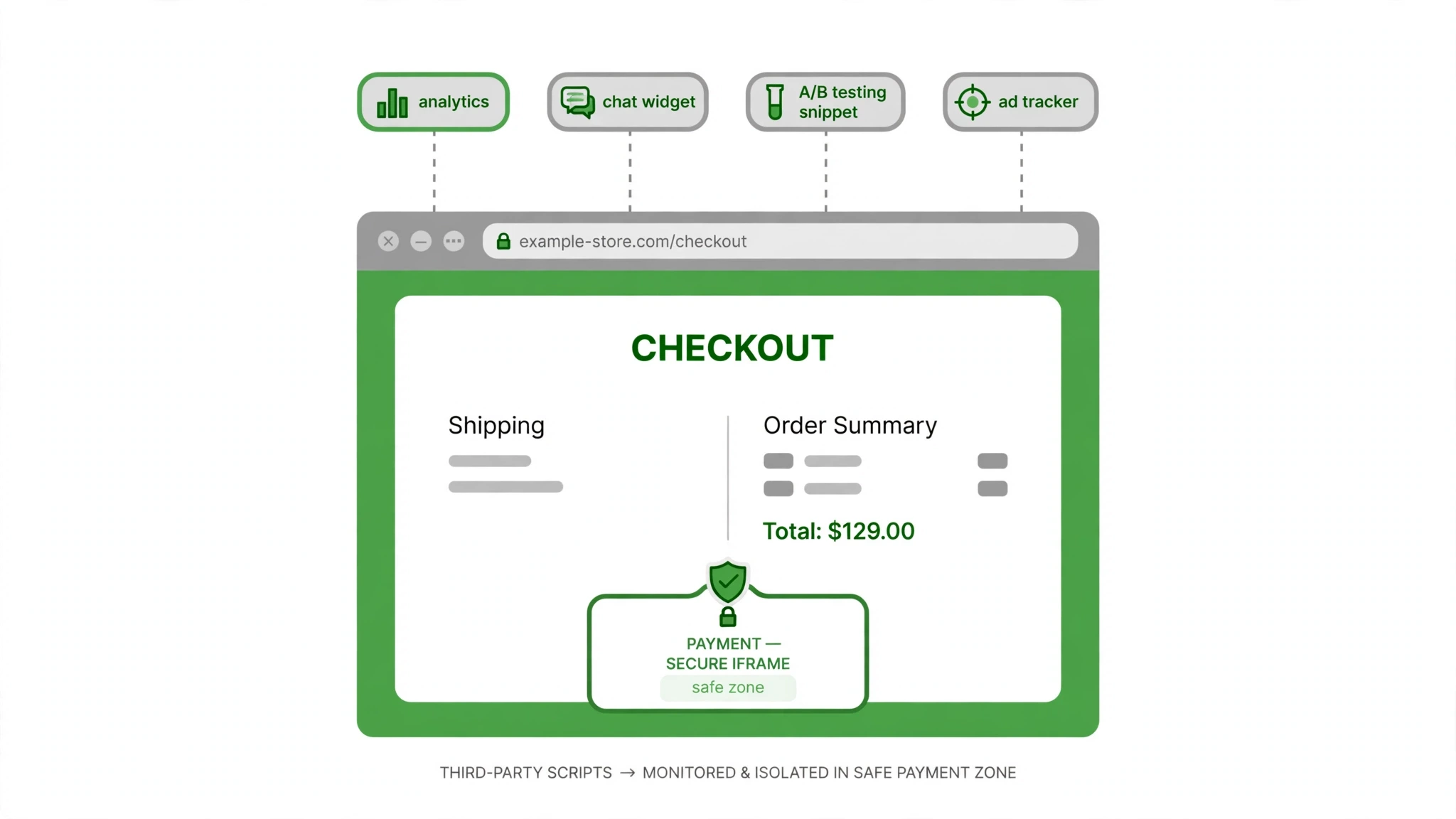
This is the supply-chain reality of modern marketing. A typical small business website loads scripts from its analytics provider, its ad platforms, its chat widget, its review widget, its booking tool, its email capture form, its social feeds and its tag manager — and each of those can load further scripts of its own. Every one of them runs with the same privileges as your own code on your own pages. If any one of them is compromised, the visitor’s browser cannot tell the difference between your code and the attacker’s code. It simply runs what it is given.
The practical lesson is to treat vendor trust as a decision you revisit, not a decision you make once. List every third-party script your site loads, and ask a simple question about each one: what could this script do if it turned hostile? A chat widget can read everything a visitor types. An analytics script can see every page a visitor views. A testing snippet runs on every page, by design.
The scripts with the broadest access deserve the closest attention, and the ones you no longer use deserve to be removed entirely. A forgotten A/B testing snippet from a trial you abandoned two years ago is still a live door into your site.
It also means asking vendors direct questions before you buy, and again after an incident like the Optimizely cyberattack. How does the vendor protect the code it serves to your visitors? Who can change that code, and how is that access controlled? What happens if their account system is compromised? A vendor that answers those questions clearly is a vendor worth trusting. A vendor that treats them as someone else’s problem is telling you something important about how it will behave when things go wrong.
For a small business, this lesson has a competitive edge hidden inside it. Your larger competitors load dozens of third-party tools and rarely audit them. A business that can honestly say it reviews its vendors, limits what runs on its pages and monitors for changes is offering customers something real — and it is the kind of claim that belongs in your sales conversations, not buried in a policy document.
Lesson 2: “Trusted” Scripts Are Not Safe Scripts
The phrase that keeps appearing in coverage of the Optimizely cyberattack is that the code came from a trusted source. That is accurate, and it is also the problem. Trust, in the browser’s sense, is a technical setting: a domain is allowed, a certificate is valid, a script is permitted to run. None of that says anything about whether the code is safe today. It only says the code comes from where it is supposed to come from. In the Optimizely cyberattack, it did. The code came from Optimizely’s own servers, through Optimizely’s own delivery network, and it was malicious anyway.
Marketers need to understand this distinction, because it changes what “secure” means for a website. A padlock in the browser bar means the connection is encrypted. It does not mean the page is safe. A script from a well-known vendor means the vendor is who it claims to be. It does not mean the vendor’s code has not been altered. The Optimizely cyberattack proved both points in a single day, on some of the most recognisable websites in the world.
The working response is monitoring, not blind faith. Put change monitoring on every third-party script your site loads, so that you are alerted when a file you trust changes in a way you did not expect. Review the custom code fields in your own marketing tools — the equivalent of Optimizely’s Project JavaScript — and treat anything that can run on every page as a high-privilege surface. If a tool lets anyone with a dashboard login inject code that runs on your checkout page, that login deserves the strongest protection you can give it, and the code it contains deserves a regular review.
There is a second, quieter point here. Report URI’s finding that only 24 of 256 affected hosts blocked the payload is a reminder that the defences exist and are underused. A properly configured Content Security Policy is one of the few controls that can stop a compromised vendor script from doing damage, because it limits what a script can do even after it has loaded.
Most small businesses have never configured one, and most agencies never mention it. After the Optimizely cyberattack, it is worth asking your web developer a direct question: what stops a compromised third-party script from skimming our checkout? If the answer is nothing, that is a project worth starting this month.
Lesson 3: Speed of Response Is the Trust Test
Look at the clock on 16 November and the Optimizely cyberattack becomes a story about time. The first injection was observed at 04:21 UTC. The card skimmer was added at 13:43 UTC, more than nine hours later. The mass cleanup ran in the evening. Optimizely’s status page confirmation was posted at 01:02 UTC on 17 November — roughly twenty-one hours after the first injection, and hours after the first detailed public account had already been published by Report URI.
That sequence is not a criticism of one company. It is the normal shape of a supply-chain incident: the attacker works all day, the researcher finds it, the vendor confirms it later. We covered a similar pattern in the Workday outage, where the gap between the failure and the explanation did most of the damage.
But from a brand trust perspective, the sequence is the whole story. For most of the day, visitors to 178 organisations’ websites were being served malicious code while nobody outside the attacker’s circle knew. The organisations themselves found out from a researcher’s public post, or from the vendor’s status page, long after the exposure had happened.
The lesson for a small business is that you cannot control when an incident like the Optimizely cyberattack happens, but you can control how fast you respond once you know. That requires two things to exist before the incident, not after it. The first is detection: some way of knowing that something on your site has changed, whether that is script monitoring, a security plugin alert, or simply a habit of checking. The second is a plan: a short, written list of who decides what, who talks to customers, and what the first message says.
Speed also matters in a narrower sense. The Optimizely cyberattack payload was rebuilt 26 times during the day, with new capabilities added as the hours passed. The card skimmer arrived nine hours after the first injection. An incident that is caught in the first hour is a different event from the same incident caught in the ninth. For a small business, the difference between checking your site’s third-party scripts weekly and never checking them at all can be the difference between a quiet fix and a public incident.
There is a useful habit to build here, and it costs nothing. Once a week, pick one thing on your website and verify it: open your checkout page, check that the scripts loading on it are the ones you expect, confirm that your contact form still works, and look at your analytics for anything odd. It takes ten minutes. The businesses that catch problems early are rarely the ones with the biggest security budgets. They are the ones with the most regular habits.
Lesson 4: Tell Customers Before They Find Out Elsewhere
In the Optimizely cyberattack, the first detailed public account came from Scott Helme of Report URI, an outside researcher. BleepingComputer independently verified the findings. Optimizely’s own confirmation arrived later, on its status page and on X. That order — researcher first, vendor second — is common in security incidents, and it is costly for trust. When customers learn about a problem from a third party, the company’s later statement reads as a reaction, however honest it is. When the company speaks first, the same statement reads as leadership.
The rule for a small business is simple: if an incident affects your customers, tell them before they hear it from someone else. That does not mean publishing a panicked message the moment something looks odd. It means having a clear threshold — customer data may have been exposed, payments may have been affected, the site may have served malicious code — and a template ready for the moment that threshold is crossed.
The message itself should say what happened in plain language, what you have done about it, and what the customer should do next. No jargon, no minimising, no waiting to see whether anyone notices. Post the update where your customers actually are — your website, your email list and your social media channels — so the message reaches them before the rumour does.
Transparency also pays in a way that is easy to underestimate. Customers are far more forgiving of a business that finds a problem, fixes it and tells them, than of a business that stays silent and is found out later. The first version of events is a story about a company that takes its customers seriously. The second is a story about a company that hoped nobody would notice.
In the Optimizely cyberattack, the affected organisations were in the difficult position of having to explain an incident they did not cause and could not have prevented on their own systems. The ones that communicated quickly and clearly will have kept more trust than the ones that waited. The AO3 outage showed the same dynamic from the community side: when a platform communicates openly, its community carries the message for it. The FAA ground stop earlier this month offered the same lesson for travel brands, where fast, clear crisis communication protected trust while silence eroded it.
There is a practical step here that belongs in every marketing plan. Write the first draft of your incident message now, while nothing is wrong. Two short paragraphs: what happened, what we did, what you should do. Keep it on file. If the day ever comes when you need it, you will be grateful that the words already exist, and your customers will notice the difference between a message written in an hour and a message written in a panic.
Lesson 5: Your Checkout and Forms Are the Highest-Stakes Surface
The most damaging part of the Optimizely cyberattack payload was not the crypto wallet swapping, and it was not the iPhone exploit kits. It was the card skimmer. From 13:43 UTC on 16 November, the payload captured card numbers, expiry dates and security codes typed into a site’s own forms, and sent them to the attacker’s server.
The one piece of good news in the reporting is that cards entered into hosted payment iframes — the kind used by modern payment processors — were out of reach, because the skimmer could not see inside the iframe. Everything typed directly into a page’s own form was exposed.
For a small business, this is the sharpest lesson of the Optimizely cyberattack. Your checkout page, your booking form and your payment page are where your customers are at their most vulnerable, and they are also where a compromised script does the most damage. A visitor who browses your blog while a malicious script runs has lost very little. A visitor who types their card number into your checkout while a malicious script runs has lost a great deal, and they will associate that loss with your business.
The single most effective protection here is also the simplest: never let card details touch your own pages. Use a hosted payment page or a payment iframe from a reputable processor, so that card numbers are entered inside the processor’s frame and never pass through your site’s code at all. That is the standard modern payment processors are built around, and it is the reason the skimmer in the Optimizely cyberattack could not reach cards entered that way. If your checkout still collects card numbers in your own form fields, changing that is the highest-value security project on your list.
Beyond payments, apply the same thinking to every form on your site. Contact forms, quote request forms and newsletter signups all collect information your visitors trust you with. Ask whether each field is necessary, whether the data is handled securely, and whether a third-party script really needs to be present on the page where that form lives. A chat widget on a checkout page is a convenience. It is also a script with full access to everything the visitor types. Convenience is worth weighing against that, page by page.
This lesson also has a marketing dimension that is easy to miss. Customers are increasingly aware of payment security, and visible signs of care — a recognised payment processor, a clear statement about how card details are handled, a checkout that looks and feels professional — are trust signals that convert. The businesses that treat payment security as a marketing asset, rather than a technical chore, earn the benefit twice: fewer incidents, and more completed checkouts.
Lesson 6: Security Is Now a Marketing Asset — Say What You Do, and Prove It
There was a time when website security was invisible to customers, a back-office concern that nobody asked about. The Optimizely cyberattack is a reminder that time is over. Customers now read headlines about supply-chain attacks, card skimmers and data breaches, and they carry those headlines into their buying decisions. When a business can show that it takes security seriously, that is no longer a technical detail. It is a reason to choose that business over a competitor.
The key word is show. A vague claim on a website — “we take your security seriously” — means nothing, because every business says it, including the ones that do not. What carries weight is specificity. A checkout page that names its payment processor and explains that card details never touch the business’s own servers is specific. A privacy page that lists the third-party tools on the site and explains why each one is there is specific. A business that can answer a customer’s question about how it protects their data, in plain language, is specific. Specificity is what turns a security claim into a trust signal.
This is also where small businesses have an advantage over large ones. A large organisation with 178 peers in an incident report has to explain a complex supply chain it barely controls. A small business can genuinely know every tool on its site, because there are only a handful of them. It can review them, limit them and monitor them in an afternoon.
That is a story worth telling: not that you are invulnerable, because nobody is, but that you have looked at the risk, made deliberate choices and keep checking. Customers respond to that kind of honesty far better than they respond to a badge or a slogan.
There is one caution to carry with this lesson. Never promise what you cannot guarantee. Do not claim your site is unhackable, your data is fully safe, or your customers will never be affected by an incident. Those are promises no business can keep, and they turn a future incident from a problem into a broken promise. The honest version is stronger: here is what we do, here is why we do it, and here is what we will do if something goes wrong. That is a commitment a business can stand behind, and it is the kind of commitment that survives contact with reality.
For marketers, this lesson connects directly to conversion. Trust signals on a checkout page, on a quote form and on a service page are not decoration. They are part of the persuasion. A visitor who feels safe completes the purchase. A visitor who feels uncertain leaves. The Optimizely cyberattack gives every marketer a reason to audit the trust signals on their own site this week — and to make sure each one is true.
Lesson 7: Build a Vendor-Incident Playbook Before You Need One
The final lesson of the Optimizely cyberattack is the least technical and the most valuable: have a plan before the incident, because there will not be time to write one during it. On 16 November, the affected organisations had hours, not days, between the first public report and the questions arriving from customers, journalists and partners.
The businesses that answered well were the ones that already knew who decided, who spoke and what the first message said. The ones that struggled were the ones working it out in real time.
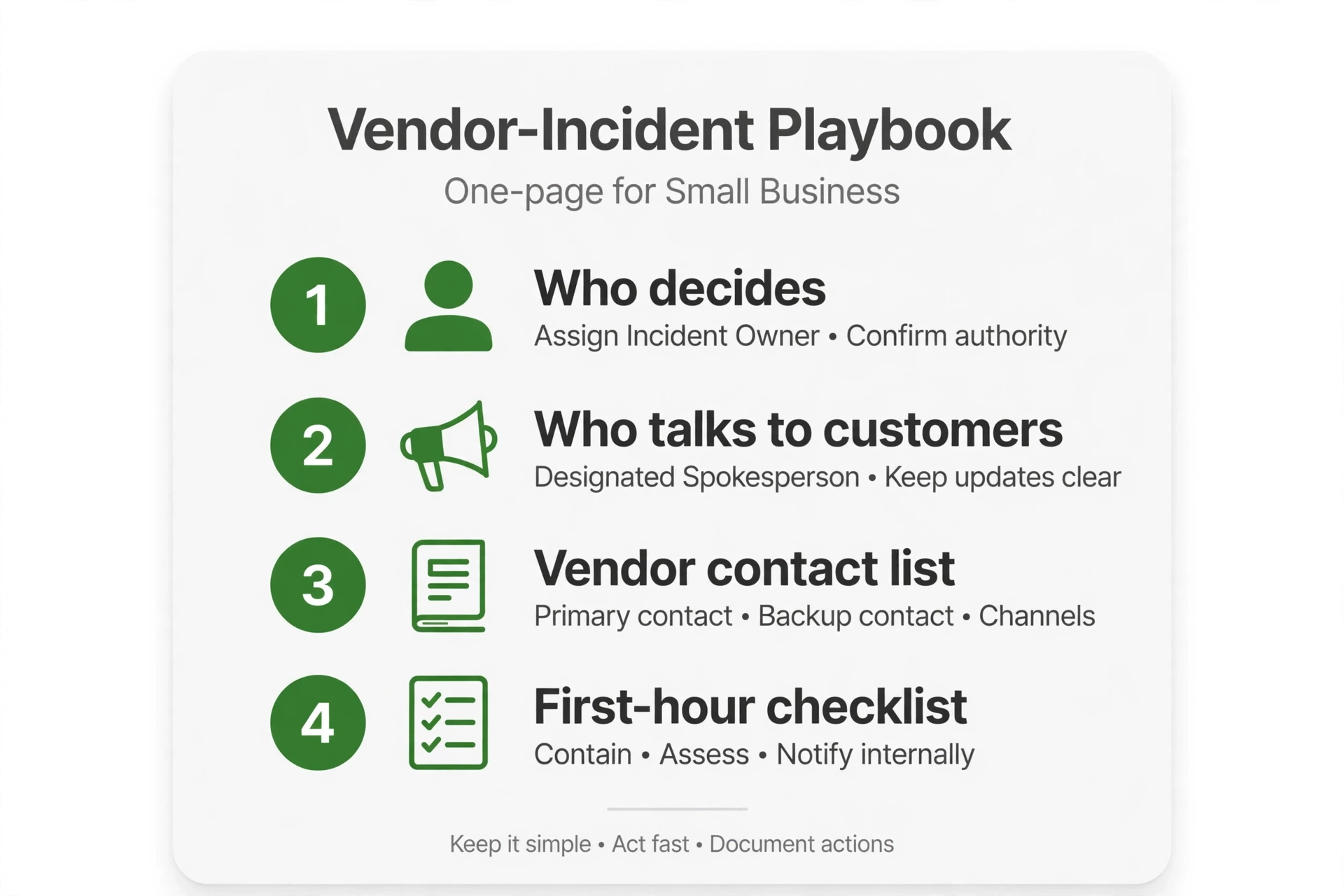
A vendor-incident playbook for a small business does not need to be long. One page is enough. It should name the person who decides that an incident has happened, the person who talks to customers, and the person who talks to the vendor. It should list the vendors whose compromise would matter most — the payment processor, the booking system, the testing and analytics tools — with a contact route for each.
It should include the threshold for telling customers, and the first draft of the message from Lesson 4. And it should include a short checklist for the first hour: confirm what happened, remove or disable the affected script, check whether customer data was exposed, and tell the people who need to know.
The playbook should also cover the question every business faces after an incident like the Optimizely cyberattack: do we keep using this vendor? There is no single right answer. A vendor that discloses quickly, fixes fast and explains honestly has earned another chance. A vendor that minimises, delays or stays silent has not.
What matters is deciding the criteria in advance, when you are calm, rather than in the middle of an incident, when every option feels urgent. Write down what a good vendor response looks like, and judge the real one against it.
Finally, the playbook needs a rehearsal. Once a year, pick a scenario — a compromised script, a payment processor outage, a data exposure — and walk through it for thirty minutes. Who calls whom? What do we tell customers? What do we disable first? The exercise will expose gaps that no amount of reading can reveal, and it will make the real thing, if it ever comes, feel familiar rather than chaotic. The businesses that handled the Optimizely cyberattack well did not improvise. They had thought about it before. That is a habit any business can copy, starting this week.
What to Do This Week: A Small Business Checklist
The Optimizely cyberattack is a story about 178 large organisations, but the actions it points to are small, practical and well within reach of any business. Here is a checklist for this week.
First, list every third-party script on your website. Ask your web developer for the list, or check it yourself with your browser’s developer tools. Remove anything you no longer use. A script from a trial you abandoned is still a live door into your site.
Second, look at your checkout and payment pages specifically. Confirm that card details are entered inside a hosted payment iframe or on the processor’s own page, and never in your own form fields. If they are not, make that change your top priority.
Third, ask your developer about Content Security Policy. A restrictive policy is one of the few controls that can limit the damage from a compromised vendor script, and the Optimizely cyberattack showed that most affected sites were not using one effectively. If you do not have one, ask what it would take to add one.
Fourth, review the custom code fields in your own marketing tools — the places where anyone with a dashboard login can add code that runs on every page. Limit who has that access, turn on the strongest login protection available, and check what is in those fields now.
Fifth, write your incident message. Two short paragraphs, ready on file: what happened, what we did, what you should do. You hope never to use it. If you need it, you will be glad it already exists.
Sixth, put script monitoring in place, even in its simplest form. A security plugin that alerts you when a file changes, a weekly manual check of the scripts on your key pages, or a monitoring service that watches your third-party dependencies — any of these is better than discovering a problem from a researcher’s public post.
Seventh, talk to your vendors. Ask the direct questions from Lesson 1: how do you protect the code you serve to my visitors, who can change it, and what happens if your account system is compromised? The answers will tell you which vendors deserve your trust, and which ones need replacing.
None of these steps requires a security team or a large budget. They require an afternoon, a developer you trust, and a willingness to treat the scripts on your website as part of your brand rather than as someone else’s problem. That is the real lesson of the Optimizely cyberattack: the code on your pages is your responsibility, even when someone else wrote it.
Conclusion
The Optimizely cyberattack will be remembered as a security incident, and it should be. A flaw in an experimentation platform’s signup flow let an attacker plant malicious code in the projects of 178 organisations, and that code was served to visitors from a domain they trusted, for most of a working day, before it was cleaned up.
The payload swapped crypto wallets, skimmed card details, stole cookies and screenshots, and aimed exploit kits at older iPhones. It was rebuilt 26 times while it was live, and it was first explained to the public by an outside researcher rather than by the company at the centre of it.
But the Optimizely cyberattack should also be remembered as a marketing lesson, because it exposed how much of a brand’s trust now rests on tools the brand did not build. Every third-party script on a website is a piece of trust handed to a vendor. Most of the time that trust is repaid without incident. When it is not, the brand on the page pays the price, not the vendor in the background. The businesses that understand that — and act on it — will be the ones customers keep trusting.
The seven lessons are simple to state and practical to apply. Audit your vendors and remove the ones you no longer use. Treat trusted scripts as code that can change, not code that is safe. Respond fast when something happens, and tell customers before they hear it elsewhere. Protect your checkout above all else, because that is where trust is most fragile. Treat security as a marketing asset, and say specifically what you do. And build a playbook before you need one, because the day you need it will not wait for you to write it.
The Optimizely cyberattack happened to other businesses, on another company’s platform, on a Monday in November. The next incident may not be so distant. The work that protects your brand from it is work you can start this week, with the tools you already have, in an afternoon. Start with the checklist above, and start with the scripts on your own site. Your customers are trusting you with their details every time they visit. Make sure that trust is well placed.
Work With a Team That Treats Your Website Like It Matters
A website is not just a brochure. It is the place where your customers hand over their details, their card numbers and their trust — and the Optimizely cyberattack is a reminder of how much depends on the choices made behind the scenes. The scripts you load, the tools you trust and the way you respond when something goes wrong are all part of your brand, whether you planned them that way or not.
If you want a website that earns trust and turns visitors into customers, it pays to work with a team that thinks about both sides of that equation: the marketing that brings people in, and the care that keeps their details safe while they are there. KKeyQik helps small businesses build websites, search visibility and campaigns that are designed to convert — with the attention to detail that turns a first visit into a lasting customer relationship.
Visit KKeyQik to start the conversation about your website and marketing.
Frequently Asked Questions
On Monday, 16 November 2026, an attacker injected malicious JavaScript into the Project JavaScript field of Optimizely Web customer projects. Optimizely's own delivery network then served that code to visitors of the affected websites. Security researcher Scott Helme of Report URI found the code in 188 of the 1,611 Optimizely snippets he checked, belonging to 178 organisations including Zoom, the BBC, CNN, Salesforce, GitLab, IKEA, HSBC and Ledger. Optimizely confirmed the incident on its status page at 01:02 UTC on 17 November, saying it had fixed the vulnerability and removed the injected code.
The payload, known as track.js, did several things at once. It swapped cryptocurrency wallet addresses shown on pages so funds went to the attacker, skimmed card numbers, expiry dates and security codes typed into a site's own forms, and sent cookies and page screenshots back to the attacker's server. On iPhones and iPads it also loaded exploit kits aimed at older iOS versions. Wallets tied to the attack had received roughly $7,040 in cryptocurrency by 19:25 UTC on 16 November, and the attacker rebuilt the payload 26 times during the day.
Most small businesses were not, because the incident only affected sites that load the Optimizely Web snippet. If your site does not use Optimizely Web Experimentation, the attack did not reach your visitors through this route. If you do use it, check with Optimizely directly, review the custom code in your projects, and look at your site's logs and reports for 16 November. The broader lesson still applies to every business: any third-party script on your site carries the same kind of risk, so the audit in this post is worth doing regardless.
A third-party script is a piece of code your website loads from another company's server — your analytics tool, chat widget, ad tracker, booking system or A/B testing snippet. It runs with the same privileges as your own code on your pages, which means it can read what visitors type and see what they view. If that vendor is compromised, the malicious code arrives from a domain you already trust, over a valid certificate, and your browser runs it without complaint. That is exactly what happened in the Optimizely cyberattack: the code came from Optimizely's own servers, and none of the affected sites had to be breached themselves.
Start by listing every third-party script your site loads and removing anything you no longer use. Ask your web developer about a Content Security Policy, which limits what a script can do even after it loads — in the Optimizely incident, only 24 of 256 affected hosts tested had a policy that blocked the payload. Put change monitoring on the scripts you keep, so you are alerted when a trusted file changes unexpectedly. Limit who can add code through your marketing tools' dashboards, and protect those logins with the strongest authentication available.
A hosted payment page or a payment iframe is the single most effective protection for card details. In the Optimizely cyberattack, cards entered inside hosted payment iframes were out of reach of the skimmer, because the malicious code could not see inside the iframe. Only card numbers typed directly into a site's own form fields were captured. If your checkout still collects card numbers in your own form fields, moving to a hosted payment page or iframe from a reputable processor should be your top priority.
A Content Security Policy is a browser rule your website sends that controls which scripts a page is allowed to run and where data can be sent. It is one of the few defences that can limit the damage from a compromised vendor script, because it applies even after the script has loaded. Most small businesses have never configured one, and most agencies never mention it. After the Optimizely cyberattack, it is worth asking your developer what stops a compromised third-party script from skimming your checkout — and if the answer is nothing, adding a policy is a project worth starting this month.
Tell customers before they hear it from someone else. Have a clear threshold — customer data may have been exposed, payments may have been affected, or the site may have served malicious code — and a short message ready for the moment it is crossed. Say what happened in plain language, what you have done about it, and what the customer should do next, without jargon or minimising. Post it where your customers actually are: your website, your email list and your social channels. Customers forgive a business that finds a problem, fixes it and tells them far more readily than one that stays silent and is found out later.
A vendor-incident playbook is a one-page plan written before anything goes wrong, so you are not working it out in the middle of a crisis. It should name the person who decides an incident has happened, the person who talks to customers, and the person who contacts the vendor. It should list the vendors whose compromise would matter most, with a contact route for each, plus the threshold for telling customers and a first draft of that message. Add a first-hour checklist: confirm what happened, remove or disable the affected script, check whether customer data was exposed, and notify the people who need to know. Rehearse it once a year with a made-up scenario.
Yes, when it is specific. Customers now read headlines about supply-chain attacks and card skimmers, and they carry those headlines into buying decisions. A checkout page that names its payment processor and explains that card details never touch your own servers is a trust signal that converts. A privacy page that lists the third-party tools on your site and explains why each one is there is a trust signal too. What does not work is a vague claim — every business says it takes security seriously. Say specifically what you do, and never promise what you cannot guarantee, such as claiming your site can never be affected by an incident.