

Updated: October 2026 · By the KKeyQik Team
Your collateral gets a short moment to do a specific job. A flyer on a counter, a brochure handed over after a meeting, a sell sheet attached to an email, or a deck opened on a laptop has to tell the right person what you offer, why it matters, and what to do next. When a piece is unclear, people may remember the colors and miss the offer. When it is planned around one message and one next step, it supports the conversations your team is already having.
Good marketing collateral design belongs to a wider identity system, not a set of unrelated pieces made one at a time. It sits alongside your logo, website, packaging, and social graphics. If you are building that system from the ground up, start with our guide to graphic design services for small business, then use this article to plan the printed and digital pieces your business needs day to day.
We treat collateral as working material: it should help a prospect compare options, give your team something useful to leave behind, or turn a presentation into a clear story. The format matters, but the message matters more — a simple flyer with a sharp offer can do more work than a glossy brochure that tries to say everything.
Key Takeaways
- Each piece of collateral should carry one main message and one clear next step.
- Choose the format by situation: quick awareness, detailed explanation, comparison, presentation, or event visibility.
- Hierarchy, spacing, contrast, and proof placement guide readers to the point you need them to grasp.
- Print files and screen files are prepared differently; color mode, bleed, resolution, and fonts need attention before release.
- Templates and a shared asset library help different people produce pieces that still look like one business.
What Counts as Marketing Collateral
Marketing collateral is the set of designed materials a business uses to explain, support, and advance a sale or inquiry — printed pieces handed to a person, plus PDFs, decks, and documents that move through email, events, and sales conversations. It gives a prospect something concrete to review after the first conversation ends.
For a small business, the list grows from real needs rather than a fixed package: a service company may need a capability brochure and a deck; a retailer may need flyers, shelf cards, and signage. The right mix depends on how your buyers learn, compare, and decide.
Common print collateral includes:
- Flyers and postcards for announcements, offers, events, and local distribution.
- Brochures that explain services, process, locations, or product ranges in a folded format.
- Sell sheets and spec sheets that summarize benefits and details on one page.
- Menus, service guides, rack cards, door hangers, and inserts where the format fits the setting.
- Event and trade-show graphics such as booth backdrops, table signs, banners, and handouts.
- Folders, letterheads, and proposal covers that support a more formal handoff.
Common digital collateral includes:
- Pitch decks and sales decks for live presentations, video meetings, and follow-up emails.
- PDF brochures, service overviews, product sheets, and onboarding guides.
- Case summaries and capability statements that show experience in a compact format.
- Email attachments, lead magnets, checklists, and worksheets that exchange value for attention.
- Social and ad graphics that carry the same campaign message into feeds and placements.
- Presentation and document templates your team can reuse without starting over.
Print and digital pieces often work as pairs. A trade-show banner draws someone in, a brochure gives the detail, and a follow-up deck continues the conversation after the event. Planning those connections early keeps the message consistent.
The Formats That Earn Their Keep
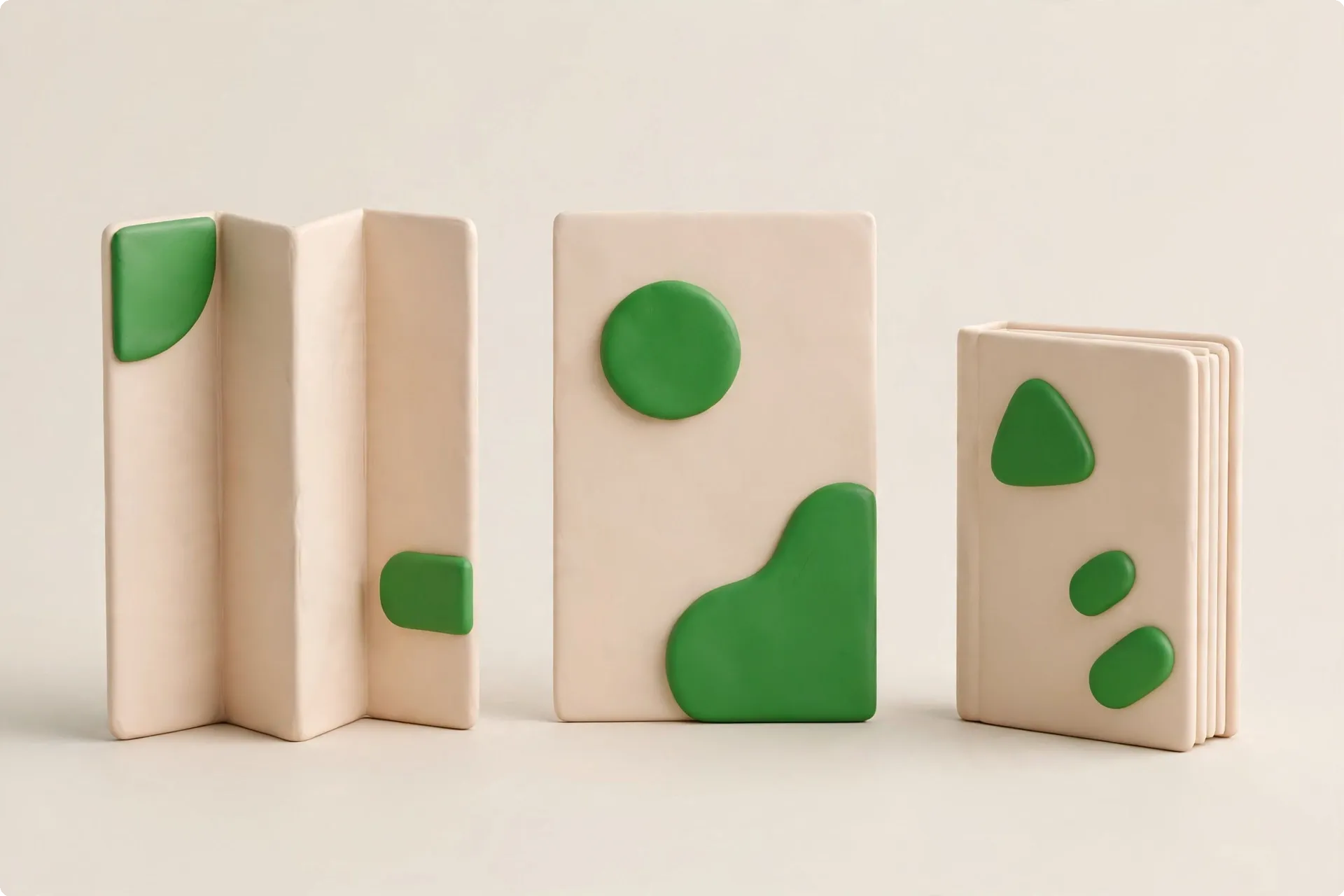
No format is useful in every situation. The question is what the reader needs at that moment: a booth passerby needs the headline and category; a comparing prospect needs detail and proof; a presentation audience needs a story that builds to a next step. The table below is a practical starting point.
| Format | Common use | What good looks like |
|---|---|---|
| Flyer | Fast announcement, event, offer, or local notice | One headline, one offer or topic, minimal detail, clear next step |
| Brochure | Service overview, company introduction, product range | Logical panel flow, scannable sections, room for proof and contact details |
| Sell sheet | Focused product or service summary for follow-up | Clear benefits, key details, simple comparison points, strong closing prompt |
| Pitch or sales deck | Presentation, proposal support, partner meeting | Story-led slides, one idea per slide, readable type, speaker-friendly flow |
| Event graphics | Booth, table, retail, or venue visibility | Short message readable at distance, strong brand cues, matching handout |
Flyers
A flyer is a quick read. It works when the audience needs one piece of information: an event is coming, a service is available, a new location has opened, or a program is accepting sign-ups. The space is small, so the message has to be narrowed before design begins. If a flyer tries to carry your full service list, company history, and three offers, the reader gets fragments instead of a point.
We structure a flyer around a headline that names the benefit or event, a short supporting line, the essential details, and one next step. The headline has to work if someone glances at the piece for a few seconds. Include what a person needs to act: date, place, service area, website, or phone.
Brochures
A brochure earns its keep when the reader needs more than a headline but less than a full proposal. It can introduce a company, explain a process, compare service levels, or overview products and capabilities. The folded format creates a reading order: the cover earns the open, inside panels build in sequence, and the back panel carries contact details or a next step.
Brochures fail when treated as miniature websites: a website can branch, a brochure has to guide. We plan the panel flow before writing final copy — what the reader sees first, what the next panel answers, where proof belongs. Crowded panels make even good information feel hard to use.
Sell Sheets
A sell sheet is a focused one-page summary, useful after a conversation, inside a proposal packet, or as an email attachment. It can carry more substance than a flyer — benefits, features, service components, process steps, proof — while staying focused on one product, service, audience, or use case.
Strong sell sheets make comparison easy: short headings, grouped details, plain language. Put the outcome first, then the evidence. Give technical detail in a clean block rather than scattering it through promotional copy. End with a next step, such as visiting a page or reaching the team through the contact page.
Pitch & Sales Decks
A deck has two related jobs. Live, slides support the speaker: visual, paced, and light on text. Emailed, the same deck may be read without narration. Good deck design accounts for both, sometimes with separate presentation and reading versions. The story stays clear either way: context, problem, approach, proof, process, and next step.
Each slide should make one point; if it needs several unrelated messages, split it. Simplify charts until the point is visible, and choose graphics that reinforce the claim rather than fill space. Plan the last slide early — a deck that ends with a vague thank-you wastes the moment when the audience is most ready to decide what happens next.
Event and Trade-Show Graphics
Event graphics work at a distance and under time pressure. A booth backdrop, banner, or table sign has to identify your business, state the category or offer in plain words, and look credible from across the aisle. Fine print belongs on the handout, not the backdrop, and the booth should match the pieces on the table so visitors see one business.
Before designing event pieces, confirm the physical setup: booth size, banner dimensions, lighting, table placement, and approach direction. A design that looks balanced on a monitor can fail when a table blocks part of it. Keep the main message high and clear, with detail at reading height.
Design Principles That Make Collateral Convert
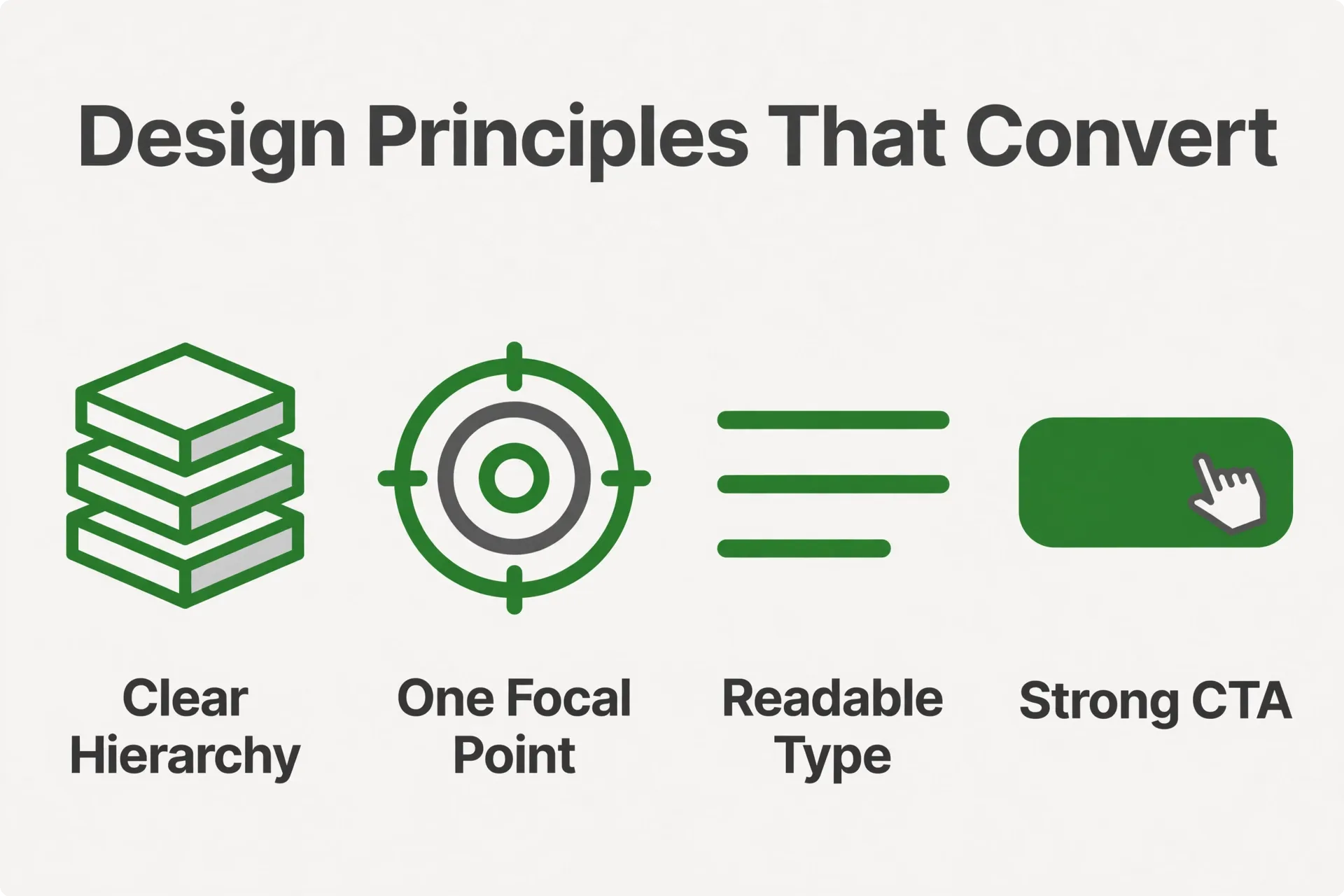
Conversion here does not mean a piece of paper or a PDF does all the selling. It means the collateral moves the reader one step closer to a conversation, a visit, a download, a sign-up, or a reply. The design has to reduce confusion and make the next step obvious. These principles apply across flyers, brochures, sell sheets, decks, and event graphics.
Start With One Message
Every piece should answer one primary question: what is this, who is it for, why should the reader care, and what should they do now? Secondary details can support those answers but should not compete with them. If a flyer promotes a workshop, the workshop is the message; your other services can wait. We write the one-sentence message before opening a design file — headlines, images, proof, and details either support it or get cut.
Use Hierarchy to Guide the Eye
Readers scan before they read. Research from Nielsen Norman Group describes an F-shaped pattern for reading web content, where people often move across the top, then down the left side, looking for useful cues. Headings, opening lines, and clear structure help print readers find the point the same way.
Build hierarchy with size, weight, spacing, and placement. The headline should be unmistakably first, subheads should summarize in plain language, and body copy should sit in short blocks. Use lists where the reader is comparing items or scanning steps. When everything shouts, nothing leads.
Give One Clear Next Step
Collateral should not end with information alone. Tell the reader what to do next and make that step easy to find. On print, that may mean a short URL, phone number, QR code, or direction to the contact page; in a deck, a closing slide with the next step; in a PDF, a clickable contact link.
Use one primary next step per piece. If a flyer asks the reader to visit a page, phone the office, scan a code, and follow an account, the message splits. Choose the step that matches the setting — a sell sheet may direct readers to the contact page, a post-meeting deck may ask for a reply to confirm scope — and give it visual priority.
Place Proof Where It Supports the Claim
Proof works when it appears near the claim it supports. If a brochure says your process is structured, a short process summary proves it better than a generic testimonial placed pages away. If a sell sheet describes reliability, include the details that make it plausible: response process, quality checks, deliverables, or support steps.
Use proof that is specific and permitted. Client names, quotes, project images, and certifications should be accurate and approved for use — do not invent numbers or borrow credibility you cannot show. A smaller amount of real proof beats a page of vague praise. Give it a consistent style: quote blocks, callout panels, or short case snapshots.
Make Readability and Accessibility Part of the Design
Attractive collateral that is hard to read will lose people. Choose type sizes that suit the format and viewing distance, keep line lengths manageable, space sections generously, and avoid body text over busy images. Check color combinations for contrast, especially smaller text.
The W3C explains that accessibility helps people with diverse abilities perceive and understand content; its introduction to web accessibility applies to digital documents and PDFs as well as websites. For text contrast, the W3C’s WCAG guidance on minimum contrast gives designers a standard to check against.
Print-Ready vs Screen-Ready: Getting Files Right
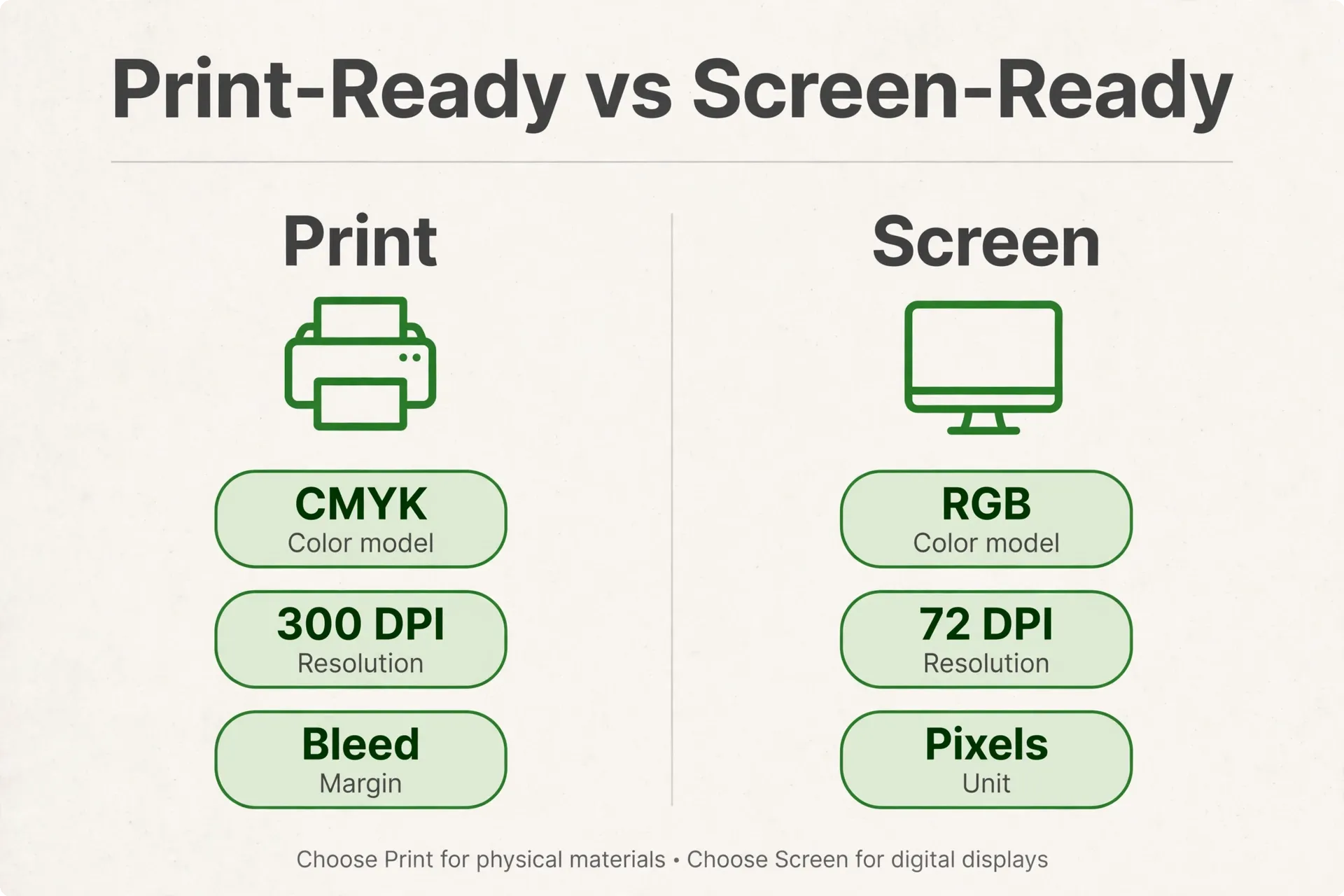
Many collateral problems appear at handoff: trimmed edges, dull color, fuzzy images, or missing fonts in print; heavy files, broken links, or substitute fonts on screen.
Color Mode: CMYK for Print, RGB for Screen
Screens display color in RGB, built from light. Commercial printing typically uses CMYK, built from ink. Colors that glow on a monitor can shift when converted for print, especially bright blues, greens, and neon tones. For print collateral, build the file in CMYK or convert with care and proof the result. For screen PDFs, decks, and digital graphics, RGB usually keeps colors closer to what the designer saw on display.
Decide the destination early. A brochure that will be printed and emailed may need two versions: a print file with CMYK and bleed as the printer requests, and a screen PDF in RGB with clickable links and a manageable file size.
Bleed, Trim, and Safe Areas
When color or imagery runs to the edge of a printed piece, the file needs bleed: extra background area that extends beyond the trim line so cutting does not leave a white sliver. Keep important text and logos inside a safe area away from trim and folds. This matters on flyers, postcards, brochure covers, and event graphics where large backgrounds are common.
Ask the printer for their template or specifications before finalizing. Page size, bleed amount, and fold marks vary, and a quick spec check prevents surprises that appear only after printing.
Resolution and Image Quality
Images that look fine on a phone may not hold up on a printed brochure or large banner. Use source images that are large enough for their final placed size. Keep logos and icons in vector format where possible so they scale cleanly. Avoid pulling low-resolution images from presentations or social posts into print pieces.
For screen files, balance sharpness with file size so decks and PDFs stay easy to email and open. Keep text as real text rather than flattening whole pages into images; that helps readability, PDF search, and accessibility.
Fonts, Links, and Final Checks
Fonts can shift a layout when they are missing or substituted. Print files may need fonts embedded or outlined per the printer’s preference; screen PDFs should embed fonts for consistency across devices. Decks shared outside your team may need embedded fonts or a PDF version.
Before release, open the file on another device, click every link in the screen version, confirm page order, and proof names, dates, addresses, and contact details. For print, request a proof — it reveals color, scale, and readability issues while they can still be corrected.
Keeping Collateral On-Brand Across Teams
Collateral often gets made under pressure: a one-pager today, a partner deck by Friday, a banner and handout for an event. Without a system, each request becomes a fresh design problem and the brand drifts — an old logo here, a different headline style there, a photo that matches nothing. Together, those small errors make the business look less organized than it is.
Build Templates for Repeated Needs
Start with the pieces your team uses repeatedly — sell sheets, case summaries, proposal covers, slides, event handouts — and turn them into templates with fixed brand elements and flexible content areas. Protect logo placement, margins, type styles, color use, and footer details while leaving room for the message to change.
Templates also speed up writing. With defined sections for audience, benefits, details, proof, and next step, the team knows what to gather, and the reader gets a familiar format across pieces.
Maintain a Shared Asset Library
An asset library is the single place where current logos, brand colors, type information, approved photos, icons, product images, boilerplate copy, and final collateral files live. Name files clearly and keep final versions separate from working files. Retire old logos and outdated pieces so they do not keep circulating by accident.
The library does not need to be complicated — just current and easy to find. If the team cannot locate the right logo or current brochure, they will use whatever sits on their desktop, and inconsistency spreads. A simple folder structure and one person responsible for updates prevent most of it.
Write Down the Rules That Matter
Brand guidelines for collateral can be brief: logo clear space and misuse, colors, typography, image style, voice basics, and contact details. Include examples of a good flyer headline, sell sheet structure, and deck closing slide. The goal is to answer the questions people ask when making a piece quickly.
Review collateral as a set from time to time. Lay the flyer, brochure, sell sheet, deck, and event graphic side by side: do they use the same service names and send readers to the same next step? If not, update the templates and library first. Fixing the system beats correcting one file at a time.
Further Reading
- Graphic Design Services for Small Business (2026) — the full picture of logo, identity, collateral, packaging, and social graphics.
- Brand Identity Design: What’s Included Beyond the Logo — how identity systems keep every piece consistent.
- Social Media Graphic Design: Sizes & Formats That Perform in 2026 — carrying the same message into feeds and placements.
Plan Collateral That Works as a System
If your flyers, brochures, sell sheets, and decks feel disconnected, the fix is rarely a single redesign. It is a clearer system: one message per piece, formats matched to real situations, correct files for print and screen, and templates your team can use without drifting off brand. That is how we approach marketing collateral design as part of your wider identity.
Tell us what your team needs to explain, present, or hand out, and we can help you plan the pieces around those conversations. Start here: contact the KKeyQik team.
Frequently Asked Questions
Start with the piece your buyers ask for most often. For many service businesses, that is a one-page overview or sell sheet that explains what you do, who it helps, and how to get started. If you present often, a clean deck may come first. Choose based on the conversation that already happens every week, not on what looks impressive. One useful piece beats several pieces nobody hands out.
A print-ready file is built for the printer's specifications: correct page size, CMYK color, bleed where artwork reaches the edge, safe margins for text, sharp images at final size, and fonts embedded or outlined as the printer prefers. The designer should also confirm fold lines, page order, and paper-related requirements. Always review a proof before a full print run so color, trimming, and readability can be checked while changes are still possible.
It can, but separate versions usually work better. A print PDF needs CMYK color, bleed, and high-resolution images, which can make the file large. An email PDF works better in RGB with clickable links and a smaller file size. We typically prepare both from one approved design so the message stays identical while each file is set up correctly for how it will actually be used and shared.
Update when the structure still works and only details have changed: services, contact details, photos, or wording. Redesign when the piece no longer matches your brand, the message has shifted, the layout is crowded, or the format no longer fits how your team uses it. A practical test is whether a new employee could hand it out confidently today. If the team keeps apologizing for it or working around it, a redesign is overdue.
A presentation deck supports a speaker, so slides carry one idea each with minimal text and strong visuals. An emailed deck is read without narration, so it needs slightly fuller captions, clearer transitions, and context a live speaker would normally provide. Many businesses keep both versions: the live deck for meetings and a reading version for follow-ups. The story, branding, and closing next step should stay the same across both.
Only as many as you have genuinely different audiences or offers. A separate version makes sense when the message, service details, or next step changes, such as one sheet per service line. It does not make sense to remake the same piece with minor wording swaps. A well-built template lets you produce focused versions without starting from zero, while keeping layout, branding, and contact details consistent across every version.
Consistency comes from a system, not from checking every file by eye. Provide templates for repeated pieces, a shared library with current logos and approved images, and short guidelines covering colors, type, and contact details. Keep final versions in one place and retire outdated files. When someone needs a new piece, they start from the template instead of a blank page, so the brand holds together even under deadline pressure.
At minimum: your business name and logo, a clear statement of what the piece is about, the details the reader needs to decide, and one next step with a way to take it. Depending on the format, that next step may be a short web address, phone number, QR code, or direction to your contact page. Check names, dates, and contact details on every revision, because small errors in collateral tend to get reprinted and reshared.
As long as the decision requires and no longer. A sell sheet is one page by definition and should stay focused on a single service or product. A brochure can carry more, but each panel should answer one question in sequence: what it is, who it helps, how it works, why to trust it, and what to do next. If content does not help the reader decide, move it to your website or a follow-up document instead.
Yes, and it should. Collateral, your website, and your social graphics work best as one system with shared colors, typography, imagery, and service names. A prospect may see a social post first, visit your site, then receive a PDF or brochure; if each looks unrelated, the business feels less established. We plan printed and digital pieces together so recognition builds across every touchpoint and each piece reinforces the others.