

Introduction
On Thursday, November 12, 2026, the Outlook outage left Microsoft Outlook unusable for an enormous number of people. Within about ninety minutes, nearly 120,000 users had reported problems to the outage tracker Downdetector. On Google, “outlook outage” passed two million searches, rising 1,000 percent in a single day. Business inboxes would not load. Desktop apps disconnected. Phones stopped syncing. For hours, the tool that most American businesses use to talk to their customers could not be used to talk to anyone at all.
That is the whole point of crisis communication strategies. Most marketing is built for good days: the launch, the campaign, the seasonal push. Crisis communication is built for the day something breaks — and the uncomfortable truth of 2026 is that something breaks often. In the last two years alone, a faulty security update grounded airlines, a cloud failure took down payment systems, and a configuration change knocked out a content delivery network used by a large share of the internet.
Microsoft’s own email service has now joined that list twice in one week, after a separate mail-delivery failure earlier in November. Outages are no longer rare events a small business can ignore. They are a recurring feature of the tools every small business depends on.
The question is not whether your business will face one. The question is what your customers will hear from you while it is happening — and whether what they hear makes them trust you more or less when it is over. The Outlook outage is a useful case study precisely because Microsoft, with all its resources, still got parts of the communication wrong: its own status page was unreachable at points, and its first messages were vague about scope and timing. A small business cannot outspend Microsoft on infrastructure. But it can out-communicate a giant, because crisis communication strategies are about speed, honesty and preparation, not budget. The seven lessons below show how.
What Happened: The Outlook Outage of November 12
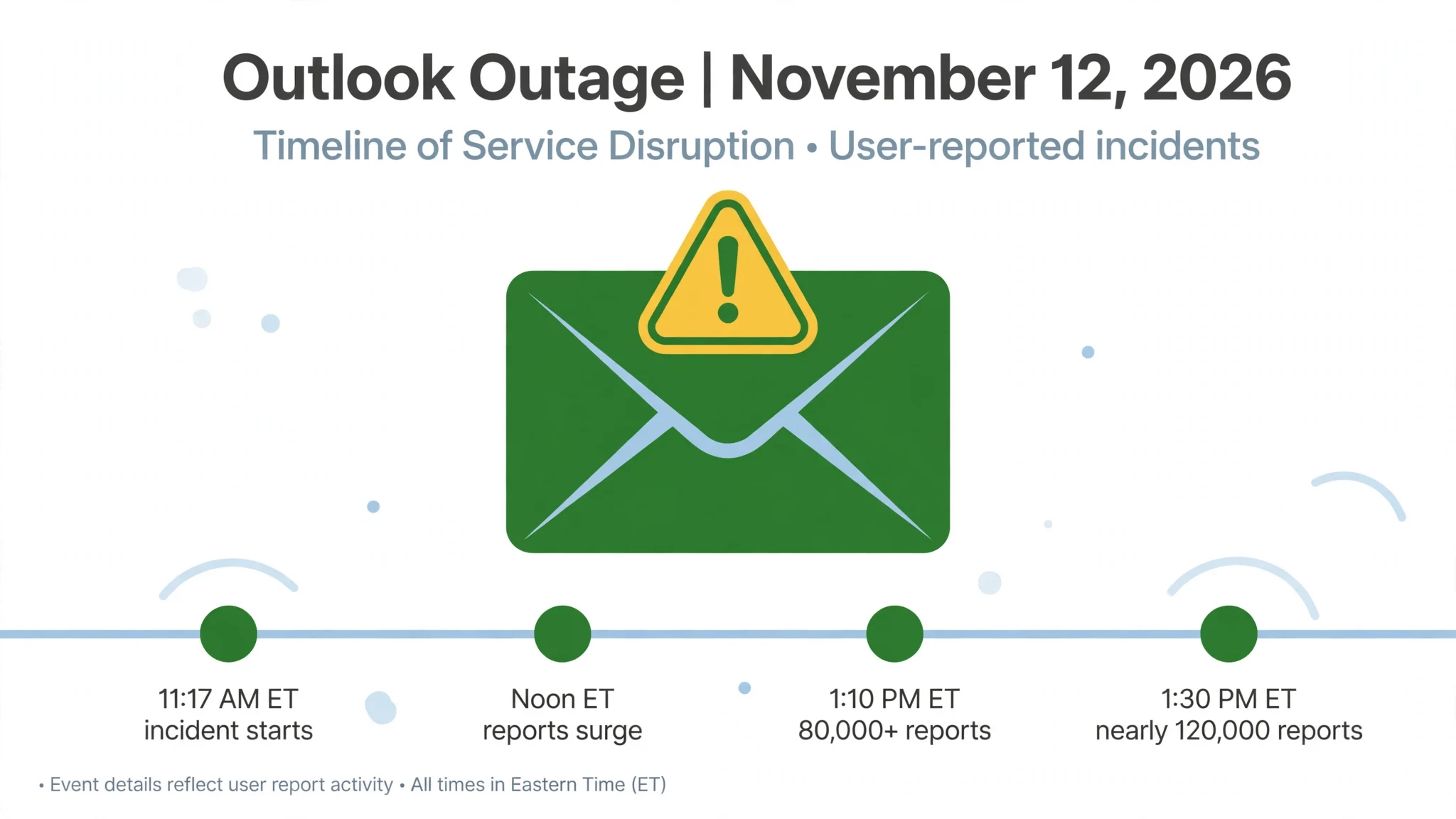
The facts first, because the timeline explains why the search spike was so large. Microsoft’s service health notice, tracked under incident code EX1550543, put the start of the incident at 11:17 a.m. Eastern Time on Thursday, November 12, 2026. The problem sat in Exchange Online, the service that hosts business email for Microsoft 365. Users found they could not reach their mailboxes through Outlook on the web, the desktop app, mobile sync or third-party apps that connect to the service.
Reports on Downdetector began surging at around noon Eastern. Roughly 12,000 reports arrived within the first half hour. By about 1:10 p.m., reports about Outlook alone had passed 80,000. By around 1:30 p.m., nearly 120,000 users had reported problems. Microsoft’s first public message said it was investigating reports of users having trouble reaching Exchange Online mailboxes in the Americas. Within hours, that scope widened: the company said the issue “may affect Microsoft 365 service connectivity for users in any region.”
Microsoft’s early explanation was that part of its infrastructure was experiencing “elevated load” and that it was “redistributing connection traffic across our broader worldwide infrastructure to help balance the load.” It also said its automated recovery features had taken action and that its telemetry showed those actions were “effectively reducing impact.” At the time of reporting, the company had given neither a final root cause nor a timeline for a full return to normal.
The disruption reached further than email. A second incident code, MO1550821, covered broader Microsoft 365 connectivity, and coverage named Teams, SharePoint and OneDrive, Copilot, Word for the web and Microsoft Defender among the affected services. Worst of all for the people trying to find out what was happening, the Microsoft 365 admin centre — the very place administrators go to check service health — was itself reported unreachable at points, and Microsoft’s own public status page was described as unavailable during the disruption. The company that sells the tools for communicating with customers could not, for a stretch, communicate with its own.
For marketers, the pattern matters more than the technical detail. Nobody planned this spike. No brand bought it in advance. It arrived because the single most-used business communication tool in the United States stopped working in the middle of a working day, and millions of people reached for their phones to find out why. That is the raw material of crisis communication strategies: attention that gathers itself, in minutes, around a problem your customers already feel. The businesses that understand crisis communication strategies were the ones ready to tell their own customers what was happening — not with a scheduled newsletter from Tuesday, but with an honest message published while the outage was still on.
Why This Matters: Email Is the Backbone, and the Backbone Breaks
It is easy to treat an email outage as somebody else’s problem. Your business did not cause it. You cannot fix it. Your customers know that. But that framing misses what actually happens inside a small business when email stops. Email is not one channel among many for most small firms. It is the channel through which orders arrive, invoices go out, appointments are confirmed, quotes are sent and complaints are handled. When it stops, the business does not lose a marketing tool. It loses its nervous system.
The cost of that loss is well documented. A widely quoted Gartner estimate puts the average cost of IT downtime at 5,600 dollars per minute. In ITIC’s 2024 survey of more than 1,000 firms, over 90 percent of mid-size and large companies put the cost of a single hour of downtime above 300,000 dollars.
A small business will not lose that much in an afternoon, but the shape of the loss is the same: orders that cannot be confirmed, customers who cannot reach you, and staff who cannot do the work they were hired to do. And because the outage is visible — your customers feel it at the same time you do — the damage is not only financial. It is reputational, and reputation is the one asset a small business cannot buy back.
That is why crisis communication strategies belong in the marketing plan, not in the IT manual. Marketing is, at its core, the management of what customers think and feel about your business. An outage is a moment when what they think and feel is being decided in real time, with very little information, and the business that says nothing leaves that decision entirely to rumour and frustration.
The research on this point is consistent. Teams that communicate proactively during incidents see far lower churn than teams that stay silent — one industry analysis put the difference at 60 percent. A well-run status page can cut “is it down?” support tickets by up to 40 percent during an incident, according to PagerDuty’s 2025 State of Digital Operations report. And 89 percent of software buyers check a vendor’s status page before purchasing, according to G2’s 2025 buyer survey. Communication during a crisis is not a courtesy. It is the measurable core of crisis communication strategies, and a visible part of how customers judge you.
There is a second reason this particular outage matters to marketers, and it has nothing to do with November 12. Just days earlier, a separate Microsoft incident had already shown how fragile email delivery can be. From November 5 to November 9, 2026, mail sent to Outlook.com, Hotmail and Live addresses was bounced for senders whose domains published no DMARC record. Microsoft later said a recent update to its spam enforcement rules had wrongly marked and blocked the mail, and that the update had been fully rolled back by November 10.
The two incidents are unrelated — Microsoft’s own bulletins describe different causes — but together they make a point no email marketer can ignore: the channel you rely on most is controlled by someone else, it can fail in two completely different ways in the same week, and your customers will judge you on how you handle both. That is what the seven crisis communication strategies below are built to deliver.
Lesson 1: Acknowledge Fast — Within 15 Minutes, Even If You Know Nothing Yet
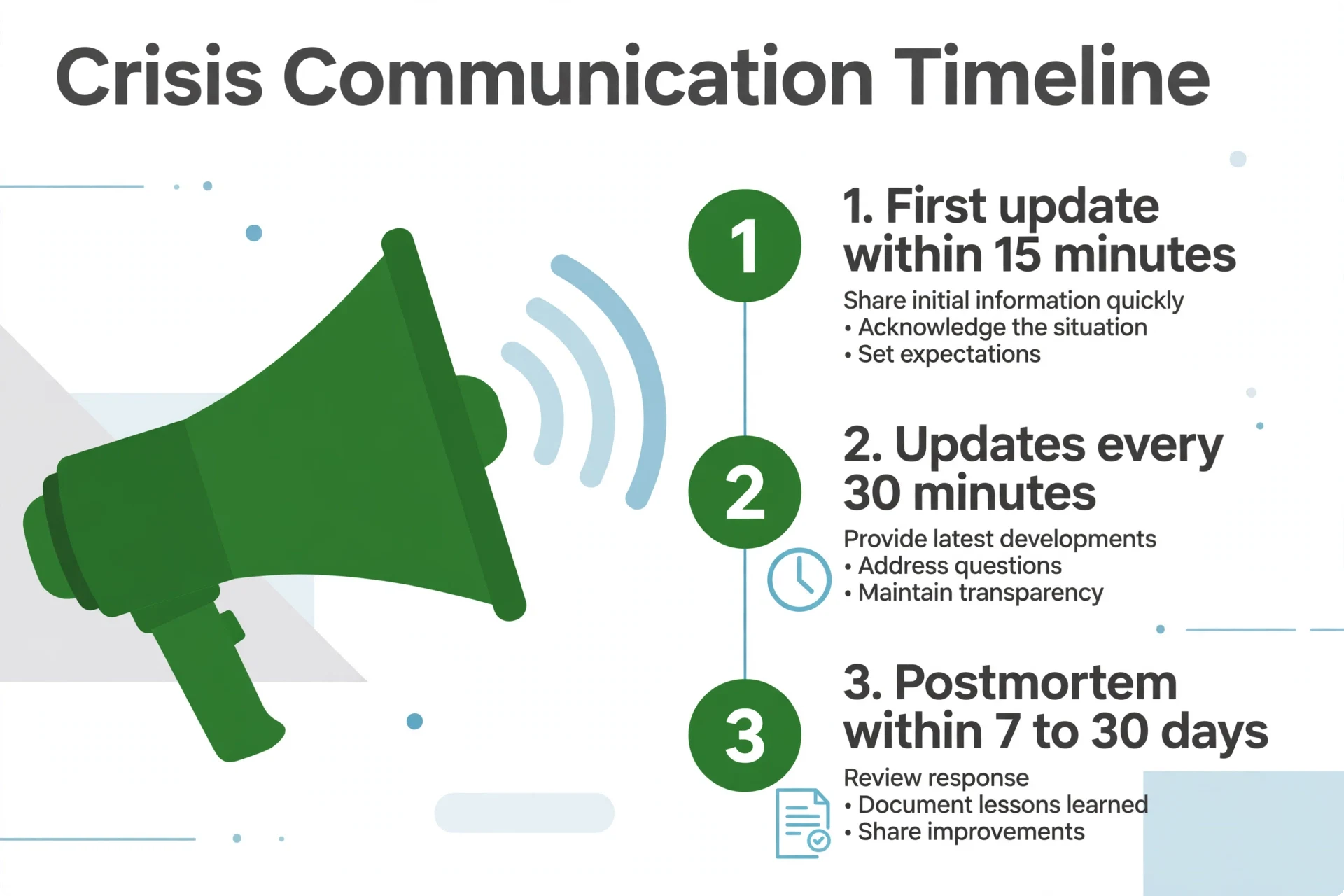
The single most consistent finding in outage communication research is also the simplest: say something quickly. Ask any practitioner what the first rule of crisis communication strategies is, and the answer is the same: say something quickly. The standard that practitioners converge on is a first public update within 10 to 15 minutes of confirming impact, even if all you can say is that you are investigating. Then update every 30 minutes for the duration of a major incident, and always say when the next update will come.
The reason is not that customers expect a fix in fifteen minutes. They do not. Those first fifteen minutes are where crisis communication strategies are won or lost. The reason is that silence is itself a message, and it is the worst one you can send. A customer who hears nothing assumes the worst: that you do not know, that you do not care, or that you are hiding something.
Every study of crisis communication strategies reaches the same conclusion: the cost of silence is higher than the cost of an imperfect message. A customer who hears “we are aware of the issue and investigating” within fifteen minutes knows three useful things: the problem is real, it is not their fault, and somebody is working on it. That is enough to stop most people from refreshing, retrying and calling your support line in frustration.
Microsoft’s own handling of the Outlook outage shows both sides of this rule. Its Microsoft 365 Status account posted early and kept posting, which is why so many people knew where to look. But its first messages were narrow — “users in the Americas” — and had to be widened hours later, which is what happens when the first message is written before the scope is understood.
The lesson is not to wait until the scope is certain. The lesson is to publish what you know, label what you do not, and promise the next update at a specific time. “We are seeing reports of email delays, we are investigating, and we will update again at 2:00 p.m.” is a complete message. It takes one sentence to write and it buys you thirty minutes of trust.
For a small business, the practical version of this crisis communication strategies lesson is a template written before anything breaks. Three sentences, with blanks: what is happening, who is affected, when the next update arrives. Keep it where the person who will post it can reach it in under a minute. If your approval chain needs three people and a legal review, you do not have crisis communication strategies. You have a press release with a shorter deadline, and your customers will have heard about the problem from someone else long before it reaches them from you.
Lesson 2: Say What You Know, What You Don’t, and When You’ll Update Next
Speed without honesty is worse than silence, because a fast message that turns out to be wrong destroys the trust the speed was meant to build. The second of these crisis communication strategies is the discipline that keeps the first one safe: every update should separate what you know from what you do not know, and it should end with a time for the next update. The question of how to communicate with customers during an outage comes up in every incident review, and the answer is always the same: early, honestly and on a schedule.
This is not a soft skill. It is the central recommendation of the joint guidance on crisis communication strategies published on September 2, 2026 by CISA, the FBI and the cyber agencies of Australia, Canada, New Zealand and the United Kingdom, titled “Communicating Under Pressure.” The guidance tells service providers to share what is known, what is unknown and what is under investigation, to provide frequent, iterative updates as new information arrives, and to avoid public-relations spin.
It was written after the November 2025 Cloudflare outage, and its core point is that during an incident, clarity and accountability matter more than polish. A message that says “we do not yet know the cause, and we will tell you when we do” is more useful than a message that says “we are working hard to resolve the issue” three times in a row.
Microsoft’s outage messages illustrate the difference. “We are redistributing connection traffic across our broader worldwide infrastructure to help balance the load” is a real statement about a real action. “Our automated recovery features have taken action to restore service, and our telemetry indicates that these actions are effectively reducing impact” is closer to reassurance than information — it tells the reader that something is happening, but not what, or when it will be finished.
Customers do not need to understand the engineering. They need to know whether to keep waiting, whether to try a workaround, and when they will hear from you again. The messages that answer those three questions are the ones that hold trust through a long incident, and writing them is the core skill in crisis communication strategies.
There is a simple structure that works for almost any outage. Lead with the impact in plain language: who is affected and what they cannot do. Follow with what you know: the scope, the cause if you have one, and what you are doing about it. Then state plainly what you do not know yet, including whether you have a restoration time. Then give the next update time. Four paragraphs, no jargon, no blame, no legal hedging. Write it once as a template, and every incident becomes a matter of filling in the blanks rather than drafting under pressure.
Lesson 3: Never Host Your Status Page on the Same Infrastructure That Just Failed
The most instructive failure in the Outlook outage was not the email failure itself. It was the failure of the place people went to learn about the email failure. The Microsoft 365 admin centre — the dashboard administrators use to check service health — was reported unreachable at points during the incident. Microsoft’s own public status page was described as unavailable. The company had to fall back to posting updates on X, a channel it does not control, because the channels it does control were caught in the same disruption.
This is the third of these crisis communication strategies, and it is the one most small businesses get wrong without realising it. A status page hosted on the same server, the same cloud region or the same provider as your main service will go down at exactly the moment you need it most. The same applies to the page on your own website where you planned to post updates, and to the email list you planned to use to notify customers — if email is the thing that broke, email cannot be the thing that tells people email broke.
The fix is straightforward and inexpensive, and it belongs in every set of crisis communication strategies. Host your status page on infrastructure that is entirely separate from your main service — a different provider, a different region, a different account. The standard advice from status page practitioners is blunt: a status page that shares fate with the service it monitors is not a status page, it is a second outage waiting to happen.
The same logic applies to the rest of your communication stack. Keep at least one customer-facing channel that does not depend on the tool that is most likely to fail. For most small businesses, that means a social media account you can post from on a phone, a phone number customers can actually reach, and a status page hosted somewhere your main provider cannot take down.
There is a second half to this lesson, and it is about honesty. Never fake green. A status indicator that says “all systems operational” while customers are reporting failures costs more trust than ten honest incidents. The practitioners’ rule is that a status page showing 99.95 percent uptime with documented incidents and resolutions is more trustworthy than one showing 100 percent forever. Customers do not expect perfection. They expect to be told the truth, and they remember the businesses that told it. That honesty is the cheapest of all crisis communication strategies, and the one customers remember longest.
Lesson 4: Don’t Put All Your Customer Contact in One Basket
When the Outlook outage hit on November 12, the businesses hit hardest were not the ones whose email stopped. They were the ones whose email was the only way they talked to their customers. If your order confirmations, appointment reminders, support replies and marketing all flow through one inbox on one provider, a single outage silences your entire business at once — and silences it in exactly the way your customers notice first.
That is the fourth of these crisis communication strategies: build a second channel before you need one, because every guide to crisis communication strategies agrees that a single channel is a single point of failure. The channel does not have to be elaborate. A text-message list for urgent updates, a social media account that customers actually follow, a phone line with a recorded message, or a simple page on a separate host that says what is happening and when you will update it.
What matters is that the channel exists, that customers know about it before the crisis, and that it does not depend on the same provider as the channel it replaces. A backup that lives on the same infrastructure as the primary is not a backup.
The November 5 to 9 mail-delivery failure makes the same point from the opposite direction. That incident did not stop anyone from reading email. It stopped mail from being delivered — messages sent to Outlook.com, Hotmail and Live addresses were bounced, and the senders were told their messages lacked authentication records. The cause, according to Microsoft’s final bulletin, was an update to its spam enforcement rules that wrongly marked and blocked legitimate mail, and the fix was a full rollback on November 10.
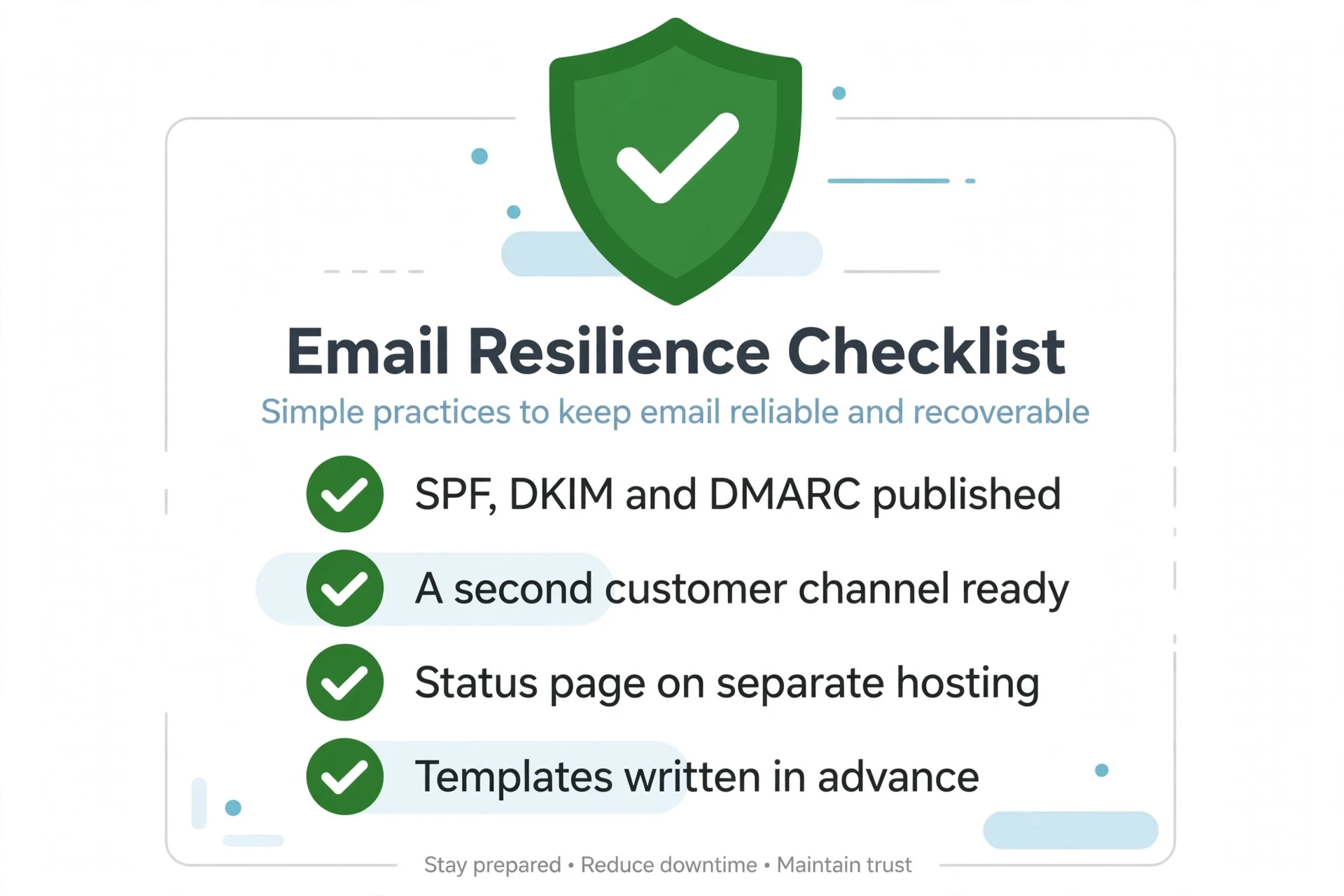
But the practical lesson for a small business is about email authentication, and it is one that too many senders have ignored: publish SPF, DKIM and DMARC records for your domain, and check them regularly. In one scan of more than 5.4 million domains published in 2026, nearly 29 percent had SPF or a DKIM key but no DMARC record at all. Those are the domains most exposed when a large provider tightens its filters, and the exposure is silent — your mail simply stops arriving, and you find out from a customer who never got the quote.
Email marketing depends on deliverability, and deliverability depends on authentication. That is an email marketing lesson the November outage taught twice over: once when mail stopped being delivered, and once when inboxes stopped loading. Treat SPF, DKIM and DMARC as part of your crisis communication strategies, not as an IT chore: they are the difference between a message that reaches your customer during a crisis and one that is rejected before it leaves the provider. Check them the way you check your bank balance — regularly, and before you need them to work.
Lesson 5: Your Customers Don’t Care Whose Fault It Is
Every major outage of the last two years has the same shape. A provider fails. The businesses that depend on it fail with it. And the customers affected do not care about the chain of causation. They care about whether they can buy, book, log in or get an answer.
The July 2024 CrowdStrike outage is the clearest example: a faulty security content update crashed about 8.5 million Windows devices, Delta cancelled roughly 7,000 flights over five days at a cost of more than 500 million dollars, and one insurer estimated losses of about 5.4 billion dollars for Fortune 500 companies. CrowdStrike did not hack anyone. It shipped a bad update. The distinction mattered enormously to engineers and not at all to the passengers standing at dark departure boards.
That is the fifth of these crisis communication strategies, and it is the hardest one for a proud business owner to accept — yet every serious book on crisis communication strategies puts it near the front: when your service depends on a provider that fails, your customers will still hold you responsible for the experience. They are not being unfair. They bought from you, not from your provider. Telling them “it is Microsoft’s fault” or “it is Amazon’s fault” or “it is our vendor’s fault” answers a question they did not ask, and it reads as an excuse. The question they actually asked is: what are you doing about it, and when will it be fixed?
The right response, in every account of crisis communication strategies that works, has two parts. The first is to own the impact, not the cause: “Our email is down because our provider is experiencing an outage, and here is what that means for your order.” The second is to offer the workaround, even a partial one: a phone number, an alternate address, a way to place the order or reschedule the appointment without the broken tool.
Customers are remarkably forgiving of a business that is visibly trying. They are unforgiving of a business that is visibly blaming someone else. The outage was not yours to prevent. The silence was yours to break. The shrug is. The “not our problem” is.
There is a practical consequence here for how small businesses choose their tools. Before you commit to a provider, ask what happens when it fails — not whether it will fail, but when, because the record of the last two years says it will. Know which of your services share a provider, a region or a single point of failure. If your website, your email and your payment processing all run on the same cloud, one incident can take out all three at once. Mapping those dependencies takes an afternoon, and it is the cheapest insurance in this entire post.
Lesson 6: Turn the Outage into a Trust Deposit — Publish the Postmortem
The incident ends when the service comes back. The communication does not. The sixth of these crisis communication strategies is the one that separates businesses customers remember fondly from businesses customers merely tolerate: publish an honest postmortem, and publish it soon. A postmortem is where crisis communication strategies pay for themselves, because it turns a bad day into proof of how you behave under pressure.
A good postmortem has five parts, and none of them is complicated. A timeline of what happened and when. The root cause, stated plainly, including the parts that were your own doing. What you did to fix it. What you are changing so it does not happen the same way again. And what happens to the customers who were affected — refunds, credits, rescheduled appointments, whatever applies. The standard window practitioners recommend is 7 to 30 days after the incident, while it is still fresh and while customers are still watching for it.
The reason a postmortem works is that it converts a bad experience into evidence. A customer who lived through an outage and then reads a clear, honest account of what went wrong and what changed will trust you more than a customer who never experienced an outage at all — because they have now seen how you behave when things go wrong, and that is the behaviour that actually predicts how you will treat them next time. The businesses that skip the postmortem waste that opportunity. They get the outage without the trust, and the next time something breaks, their customers have no reason to stay.
CrowdStrike’s own handling of the July 2024 outage is instructive here, and it cuts both ways. The company published a detailed root-cause analysis within weeks, committed to staged rollouts and additional validation, and was widely credited for its transparency. But it also took ten days for 99 percent of affected sensors to come back online, and the airlines and hospitals affected did not get their time back.
Transparency does not undo the damage. It does something narrower and more valuable: it gives customers a reason to believe the next time will be different. For a small business, the postmortem can be a single page or a single email. It does not need to be long. It needs to be honest, specific and published without being asked for.
Lesson 7: Build the Plan Before the Crisis — Templates, a Decision-Maker, and a Rehearsal
The final lesson is the one that makes the other six possible, and it is the least glamorous: prepare. A small business crisis communication plan is simply three things written down and rehearsed: templates, a decision-maker and a drill. Every crisis communication strategy in this post assumes three things exist before anything breaks — a set of templates, a named decision-maker, and a rehearsal. Without them, the first fifteen minutes of an incident are spent deciding who is allowed to speak, what they are allowed to say, and where they are allowed to say it. By the time those questions are answered, the fifteen minutes are gone.
The template set is short, and it is the first thing a small business crisis communication plan should contain. Four messages cover almost any outage: an acknowledgement (“we are aware, we are investigating, next update at [time]”), a scope update (“this affects [who], here is the workaround”), a resolution notice (“service is restored, here is what happened”), and a postmortem outline. Write them now, in plain language, with blanks for the details. Keep them where the decision-maker can reach them in under a minute, on a device that does not depend on the tool that is most likely to fail.
The decision-maker is one person, named in advance, who can publish without asking anyone else. If that person is you, say so. If it is a member of your team, tell them, and mean it. The point of naming the person is to remove the most common cause of slow crisis communication: nobody being sure whether they are allowed to speak. A wrong message published quickly can be corrected. A correct message published three hours late is a different kind of failure, and it is the one customers remember.
The rehearsal is the part almost nobody does, and it is the part that matters most. Once a quarter, pick a scenario — email down, website down, payment processor down — and run the drill. The decision-maker writes the acknowledgement from the template and posts it within fifteen minutes. Time it. The first time, it will feel slow and awkward. The fifth time, it will feel routine.
That routine is the whole advantage, and it is also what separates real crisis communication strategies from improvisation: the reaction looks calm because the system behind it is not improvised. According to PwC’s 2023 Global Crisis and Resilience Survey, 96 percent of 1,812 business leaders said their organisations had experienced disruption in the previous two years. The question is not whether your turn will come. It is whether you will have practised before it does.
The 15-Minute Outage Playbook
Pulling the lessons together, here is the sequence a small business can follow the next time a tool it depends on stops working. Treat it as the operational half of your crisis communication strategies: the plan you follow while the templates do the talking. Keep it printed where the decision-maker can see it — it is the most usable page in your crisis communication strategies toolkit.
Minutes 0 to 5: Confirm and assign. Check the provider’s status page, an external tracker such as Downdetector, and your own systems. Confirm the impact is real and not local to one machine. Name the incident owner for this event — the one person who will write and publish the updates.
Minutes 5 to 15: Acknowledge publicly. Post the first update on every channel you control that still works: your status page, your social accounts, and a phone message if you have one. Say what is happening, who is affected, and when the next update will come. Do not wait for the cause.
Minutes 15 to 60: Establish the rhythm. Post the scope update: what customers can and cannot do, and the workaround. Set the update cadence — every 30 minutes for a major incident — and keep it, even when the update is only “still investigating, next update at [time].”
Hours 1 to 4: Keep the cadence and add substance. Share the cause when you know it, the mitigation steps under way, and the best available estimate of when service returns — labelled as an estimate, not a promise. Notify your largest customers and key partners directly, not only through public posts.
When service returns: Confirm and follow up. Post the resolution notice with the time service was restored and what customers should do if they are still affected. Then start the postmortem clock: publish the honest account within 7 to 30 days, with the timeline, the cause, the fix and what changed.
This playbook fits on one page. Print it, fill in the blanks for your own business — your channels, your decision-maker, your provider’s status page — and put it where you will find it at the worst possible moment. That is the entire point: the plan is written on a calm day so it can be followed on a bad one.
Mistakes to Avoid
Three mistakes undo more crisis communication strategies than any other, and each of them is a failure of preparation rather than of luck. The first is staying silent while your customers find out from someone else. Silence does not buy you time. It spends trust, and the interest rate is brutal: by the time you do speak, your customers have already formed their opinion of you from the outage itself, from social media and from your competitors’ posts. Speak first, even if you have little to say. That is the first rule of crisis communication strategies, and the easiest to follow.
The second is blaming the provider. Your customers bought from you, and the explanation “it is Microsoft’s fault” tells them you have outsourced both your service and your responsibility. Own the impact, describe the workaround, and let the provider explain its own failure in its own postmortem. Your job is your customer, not your vendor’s reputation.
The third is promising a restoration time you cannot keep. “We will be back by 2:00 p.m.” feels reassuring in the moment and becomes a second broken promise when 2:00 p.m. passes and nothing has changed. Give estimates only when you have a basis for them, label them as estimates, and always attach a next-update time instead. A customer who hears “we do not know yet, and we will update you at 3:00 p.m.” will wait. A customer who hears a deadline that passes will not wait a second time.
Conclusion
On November 12, 2026, the Outlook outage left millions of people unable to reach their inboxes, reports passed 120,000 within ninety minutes, and “outlook outage” became one of the most searched terms in the United States. The outage itself was Microsoft’s to fix, and it was fixed on Microsoft’s timeline. But the communication around it was every business’s to own — and the businesses that told their customers what was happening, quickly and honestly, kept trust that the silent ones lost.
None of that was planned by a brand. All of it was available to any business that was watching. That is the promise of crisis communication strategies: the moment arrives uninvited, the attention gathers itself, and the businesses with tested crisis communication strategies are the ones that keep their customers’ trust.
The only thing your business has to bring is speed, honesty and something useful to say. The businesses that write the templates, name the decision-maker and rehearse the drill — the ones that treat crisis communication strategies as a system, not a scramble — will be ready when their own outage arrives. The ones that wait for permission will read about it the next morning, in someone else’s post.
The next outage is already on the calendar. It will not announce itself. The only question is whether your business will be ready when it happens.
If you want help turning these crisis communication strategies into a system for your business — a small business crisis communication plan built around your own tools and customers — the templates, the status page, the multi-channel plan and the email deliverability checks that keep your customers informed when it matters most — talk to the team at KKeyQik. We build SEO, social media and video marketing campaigns for small businesses that need their marketing to hold up on the worst days, not just the best ones, and we would be glad to help you plan yours.
For more on turning big moments into small business marketing, see our breakdown of the Warriors vs Rockets real-time marketing lessons, our guide to the Switch 2 Black Friday rush, and our look at Google Holiday 100’s search lessons.
Frequently Asked Questions
On Thursday, November 12, 2026, Microsoft Outlook stopped working for a large number of users when Exchange Online, the service that hosts business email for Microsoft 365, developed connectivity errors. Reports on the outage tracker Downdetector surged from a few thousand to nearly 120,000 within about ninety minutes, and "outlook outage" passed two million Google searches. Outlook on the web, the desktop app, mobile sync and third-party apps were all affected, along with other Microsoft 365 services.
Microsoft said part of its Exchange Online infrastructure was experiencing elevated load and that it was redistributing connection traffic across its worldwide infrastructure to balance the load. The incident was tracked under code EX1550543, with a second code, MO1550821, covering broader Microsoft 365 connectivity. At the time of reporting, Microsoft had not published a final root cause or a restoration timeline.
Nearly 120,000 users had reported problems to Downdetector by around 1:30 p.m. Eastern Time, roughly ninety minutes after reports began surging. The true number of affected users was certainly higher, since most people who lose email never file a report anywhere. Google Trends recorded more than two million searches for "outlook outage" in the United States, up 1,000 percent on the day.
Crisis communication is the practice of telling customers, staff and partners what is happening when something goes wrong — quickly, honestly and on a schedule. It covers the first acknowledgement of a problem, regular updates while it is being fixed, and the honest account published afterwards. For a small business, it is mostly preparation: templates written in advance, one named decision-maker, and a rehearsal, so the first message goes out in minutes rather than hours.
Within fifteen minutes of confirming the impact. Practitioners converge on a first public update within 10 to 15 minutes, even if all it says is that the team is investigating, followed by updates every 30 minutes for a major incident. Customers do not expect a fix in fifteen minutes, but silence makes them assume the worst. A short message that says what is happening and when the next update will come is enough to hold trust while the fix is under way.
Four things: what is happening, who is affected, what you are doing about it, and when the next update will come. Keep it in plain language with no jargon and no blame. If you do not yet know the cause or the restoration time, say so plainly — "we do not yet know the cause, and we will tell you when we do" is more useful than a reassuring sentence that contains no information. End every update with a specific time for the next one.
A status page is a public page that shows the real-time health of your services and carries incident updates. It must be hosted on infrastructure entirely separate from the service it monitors — a different provider, region and account — because a status page that shares fate with the service it reports on will go down at exactly the moment it is needed most. During the Outlook outage, Microsoft's own admin centre and public status page were reported unreachable at points, which is why the company had to fall back to posting updates on social media.
SPF, DKIM and DMARC are authentication records published in a domain's DNS that prove an email genuinely comes from that domain. They protect deliverability: when a large provider tightens its filters, mail from domains without these records is the first to be rejected. In early November 2026, a faulty spam-rule update caused Outlook.com to bounce mail from domains with no DMARC record for several days. Publishing all three records and checking them regularly is a basic part of keeping email marketing reliable.
A postmortem is an honest public account of an incident, published after service is restored — usually within 7 to 30 days. It covers the timeline of what happened, the root cause, what was done to fix it, what will change so it does not happen the same way again, and what happens for affected customers. A clear postmortem turns a bad experience into evidence of how a business behaves under pressure, which is often what decides whether customers stay.
Start with three things: four short templates (acknowledgement, scope update, resolution notice, postmortem outline), one named decision-maker who can publish without asking permission, and a rehearsal once a quarter. Keep a second customer channel that does not depend on your main provider — a text list, a social account or a phone line — and a status page on separate hosting. Map which of your tools share a provider so one incident cannot silence your whole business at once.